Thursday, April 28, 2011

Greasemonkey 0.9.3 Release

Bug fixes:
  • Error message logged ("Redeclaration of const document")/high CPU usage when closing the sidebar. (#1226, #1298)
  • Navigating to a .user.js inside a frame works like anywhere else. (#1248)
  • The list of user scripts in the Add-ons Manager would sometimes forget its sort order. (#1307)
  • Compatibility enhancement with AutoPager (broken in 0.9.2). (#1344)
  • Passing a non-function to GM_registerMenuCommand()'s commandFunc broke the entire menu, and items showed up in the wrong order (both broken in 0.9.2). (#1346, #1347)
Enhancements:
  • Passing the Referer header works, for GM_xmlhttpRequest(). (#1240)
  • Accessibility: The sort buttons in the Add-ons Manager work with keyboard input (space/enter). (#1345)
The entire list of bugs handled in this release is also available via the 0.9.3 milestone on GitHub. Note that as always it takes some time for Mozilla to review the new version, and it's available on the all versions page. If you are using it and notice problems, it's best to either let us know at greasemonkey-dev or log an issue (and be clear that it's with this version).

Wednesday, April 20, 2011

Breaking change: Inject into about:blank?

Back in version 0.8.2 we patched a security/privacy hole by preventing injection into file: and about: scheme URLs. This was August 2009, and at the time we specifically allowed about:blank (while blocking the rest of about:). A carefully crafted web search, [site:userscripts.org/scripts/review/ "about:blank" -"src about:blank"] reveals (among plenty false positives just making frames/windows that start blank) that real scripts are using this feature. Examples include:
Then there's scripts specifically avoiding about:blank:
Yes, I ended up finding only one real script using this feature. In much the way that I imagined it way back when. But I found four specifically trying to avoid it.

We now know of one real, serious bug with this approach. It happens to have an easy workaround, but really brings to light the issue: The about:blank page has a sort of special meaning. In this bug we know about, the browser is using a navigation to about:blank as a sort of clean-up, meaning "this content is gone", much like assigning null as a cleanup activity in some programming languages.

Therefore our current plan is to not inject scripts into about:blank unless the @include rule specifically mentions it. So if you say @include about:blank#mycustomvalue then everything will work as it does. But if you say @include * (or rely on that default) then you will not run on about:blank. Current plans would include this change in the upcoming version 0.9.3.

(As always, please find us on greasemonkey-dev to discuss the development of Greasemonkey itself.)

Tuesday, April 05, 2011

Greasemonkey 0.9.2 Release

This release primarily fixes some of the problems discovered since 0.9.0.

Bug Fixes:
  • Failure on OSX when Growl is installed, but not running. (#1264)
  • Incorrect display of Greasemonkey icon in Add-ons window (Firefox 3.6, OS X). (#1284, #1291)
  • Provide a sort bar, to control display order of the scripts in the Add-ons manager, for Firefox 4. (#1293)
  • Remove "accelerator" keys from GM_registerMenuCommand(). (#1312, previously)
  • Work around incompatibility with Personas Plus extension. (#1253)
Enhancements:
  • Provide a toolbar button, and remove the status bar icon for Firefox 4. (#1227)
  • When re-installing a script (e.g. for an update), keep it in the same execution order. (#1267)
  • Keep the add-ons manager view up to date when changing (installing/enabling/disabling/etc) user scripts. (#1305)
It should be available soon, pending normal delays for review.

Greasemonkey Usage, by Firefox Version, April 2011

I'd like to take the opportunity to review the current usage profile of Greasemonkey, as it relates to Firefox version. There's a couple points to be made, in regards to the work we've been doing recently on the 0.9 version branch of Greasemonkey. This data all comes from the addons.mozilla.org statistics for Greasemonkey.


First, we can quickly note that Firefox 1.x and 2.x combined total only one half of one percent of current usage. This is why we decided to up the minimum compatible version to 3.0. It wasn't worth the effort to try to keep things working in earlier browsers.

Also, now that Firefox 4.0 is out for a while, we can see why we went to 3.0 minimum, and not 4.0. So far only about one fifth of our users have upgraded. For everyone else, we think the recent enhancements we've been making are worth having, so we've taken special effort to make sure that we stay working in Firefox 3, and don't rely on features only available in Firefox 4. Over time, perhaps that will change. The slope is quite steep right now, but if history is any guide, there will be a substantial minority of users that stick with Firefox 3 for some time.

For reference, here's the exact data.

Friday, April 01, 2011

GM_registerMenuCommand() losing "accelerator key" feature

Script authors, take note: I'm planning on moving forward with a change to remove a small part of the functionality of GM_registerMenuCommand(). This post is to explain what part, and the justification for doing so.

With the release of Firefox 4, Mozilla has made some grand changes to the look and feel of the browser. They've moved tabs to the top, emphasized the Firefox Button over the menu bar, and removed the status bar (providing the addons bar as a temporary shim for extension compatibility). This led us to re-build parts of Greasemonkey to focus on providing a toolbar, and de-emphasize the old "monkey menu" in the status bar.

It turns out that the menu code, now controlling the Tools > Greasemonkey menu, the old status bar monkey menu (in Firefox 3.x), and the new toolbar button's menu, also controls the commands for GM_registerMenuCommand() (to put them in the menu, of course!), which also controls the "accelerator keys" for those commands.

These accelerator keys have, more or less, never worked. I've written a test script (see the source, or install it) to demonstrate this. Once installed, navigate to the page about:blank#GM_rmc (you might need to hit reload, depending on how you open this) to run the script. Pick any combination of modifiers, and a letter for the accelerator key. Then try to use that accelerator key.

I'm testing on Firefox 3.6 and Greasemonkey 0.8 -- the last versions before some of these big changes started, where everything should still be as reliable as it ever was.

I ran this test: Close Firefox, launch it to the test page with only one tab open. Register a single menu command. Open the monkey menu, click on the menu item and see the alert. Press the accelerator key. No alert. I repeated this whole process for: Shift+Ctrl+Q, Alt+Shift+X, Control+M. None of it works. I saw it working with at least one earlier attempt, but even then it was fragile: normal actions like loading pages or closing tabs caused otherwise working keys to fail.

I tried a super-simple script and it too doesn't work. Installing it and pressing Ctrl+Shift+C gives me no results, but selecting the menu item does.

I've asked on our mailing list, I've asked at userscripts.org, and I've held discussions with developers. I can't find anyone that will regret losing accelerator key support in GM_registerMenuCommand(), and all my attempts to make it work well have so far failed.

So it is going to be removed, in Greasemonkey 0.9.2. Unless I hear from someone that can show me that I've been a fool, it does work, and I'm using it wrong. Please use the mailing list to get in touch with us if so!

Monday, January 24, 2011

Greasemonkey 0.9.1 Release

This is primarily a quick release to deal with bugs found in 0.9.0.

Bug fixes:
  • Fix user script sandbox wrapping. This deals with lots of problems like eval(). (#1258, also #1254, #1260, #1263, #1265)
    If your script(s) stopped working with 0.9.0, this should fix them.
  • Fixed rare bug when installing scripts. (#1250)
  • Fixed errors when Growl is not installed on Mac OS X. (#1249)
  • Fixed problems with relative @require imperatives. (#1262)
New features/improvements:
  • Allow sorting by descending (as well as ascending) execution order. (#1217)
Known issues:
  • Incompatible with All-in-One Sidebar. (#1252)
  • Incompatible with Personas extension. (#1253)

Problems with version 0.9.0

Unfortunately, a number of problems with the recent 0.9.0 release were discovered only after it saw full public release, rather than before that, in one of our Release Candidates.

There are a few small problems related to scripts installing and running -- these are fixed, and the fixes should be released very soon.

There are also known problems with All-in-One Sidebar, and the Personas extension. These are more serious problems, and the only solution right now is to disable one or the other extension.

Keep your eyes open for release 0.9.1 which should be coming out Real Soon Now.

Tuesday, January 18, 2011

Greasemonkey 0.9.0 Release

It's been a long time coming, but it should be worth the wait! The next major release of Greasemonkey, version 0.9.0, is ready. Let's dive right into the new features:

New Features:
  • Compatibility with Firefox 4! Note that because of Firefox bug 612025 this is somewhat unsafe for 4.0b7 to 4.0b9 (inclusive). Beta 10 should be fixed (the nightly build on January 14th definitely is). Firefox 4 support is still preliminary. Everything probably works, but not everything works really well. The backlog of bugs for the next release is primarily focused on this.
  • Complete integration with the standard Firefox Add-ons dialog, treating User Scripts as just another kind of browser add-on.
    For Firefox 3, the User Script management dialog now looks like:

    And for Firefox 4.0:
  • A global options dialog, where the script editor can always be selected. (#1012, #1109)
  • Live in-place editing for the entire script, including metadata (@name, @require, @include, @exclude, etc.). (#1148, #1157, #1165)
  • Web pages that end in .user.js are loaded as normal, instead of being installed as a user script. (#1184)
Bug fixes / minor enhancements:
  • All Greasemonkey windows respond to standard close window keyboard shortcuts. (#1085)
  • Support for @icon metadata imperative, displayed in the new add-ons manager integration. (#1096)
  • Support user and password for GM_xmlHttpRequest(). (#1100)
  • Support @version metadata imperative. (#1110)
  • Suppress spurious Error: not well-formed (// ==UserScript==) error messages. (#1134)
  • The "install" menu item is removed. (#1196)

Loading image

Click anywhere to cancel

Image unavailable

Loading image

Click anywhere to cancel

Image unavailable

Thursday, April 08, 2010

Greasemonkey 0.8.6 Release

The sixth release in the 0.8 series of Greasemonkey, this release includes:

Features:
  • Add a hidden preference to allow greasing the unmht: scheme. (#1038)
  • Allow relative URLs to be used for GM_xmlhttpRequest(), just like standard XMLHttpRequest. (#1057)
  • Performance enhancements and code improvements to internal logic behind @include and @exclude rules. (#1070 #1074 #1089)
  • Added translations: ca-ES, cs, fr, nl, sr-RS, vi.
Bug fixes:
  • GM_xmlhttpRequest() can fail when Object.prototype has been modified. (#1065)
  • Two warnings upon making new script via "New User Script". (#1069)
  • Installing scripts from the hard drive (instead of via the web) can fail. (#1077)
  • Fix a flaw that could allow websites to prevent Greasemonkey from running. (#1082)
  • Error "this.menuCommanders is undefined" bug when closing a browser window. (#1087)
  • Error "ScriptDownloader is not defined" when performing view source on a user script. (#1091)

Tuesday, February 02, 2010

Greasemonkey 0.8.5 Release

Greasemonkey 0.8.5 is a maintenance release, with these fixes and improvements:
  • Add an abort() method for GM_xmlhttpRequest. (#1007)
  • Increase compatibility with bleeding-edge Firefox versions. (#1054)
  • Display a "welcome" page to new users when they install. (#1006)
  • Fix hooking into the console object for Firebug 1.5.
Thanks very much to our users on the mailing list that caught a few issues in the release candidates.

Tuesday, December 08, 2009

Greasemonkey 0.8.4 released

Hot on the heels of 0.8.3 is a single critical bugfix in 0.8.4:
  • Properly specify the .finalUrl for GM_xmlhttpRequest results. (#1063)

Greasemonkey 0.8.3 Release

Greasemonkey 0.8.3 aka "0.8.20091129.3" has been released. It contains the following changes:
  • Add Firefox 3.6 compatibility flag.
  • Use platform-dependent line endings when creating a script file. (#1004)
  • Properly handle error events, and calling the onerror callback, in GM_xmlhttpRequest. (#1008)
  • Add 'binary' option, to do a .sendAsBinary(), for GM_xmlhttpRequest. (#1017)
  • GM_setValue() will display a descriptive error, when it does not receive enough arguments. (#1005)
  • Fixed a bug that would cause the Greasemonkey info bar not to appear sometimes, when viewing a script's source.
  • Updated translations from babelzilla.org.

Wednesday, November 25, 2009

Greasemonkey API Usage

I've been intending to write this post for months, but various things got in the way. Well, it's finally ready! Some of my ideas for Greasemonkey 1.0 would involve major changes to the way that Greasemonkey runs user scripts. The goals would be to make user script authoring easier, by removing some of the quirks, limitations, and problems that Greasemonkey's current security architecture imposes.

To begin, an aside: why does Greasemonkey have a security architecture that imposes limitations and problems on script authors? It's basically history now, but in short: Greasemonkey provides the powerful-but-dangerous capability for user scripts to break the same-origin policy for AJAX requests. Lots of useful scripts have been created that hinge on this capability. Unfortunately, it is indeed powerful, and Greasemonkey by nature mashes itself and the user scripts up with any old web page that you might visit. If Greasemonkey and/or a script it is running presents a vulnerability that the content page can leverage, all sorts of nasty things could result, from stealing your bank account, creating false ecommerce purchases, stealing the content of your private files or site data, and so on.

The point of this post, then, is to examine the landscape for user scripts today. Discover what scripts are out there, what they are like, and how they operate. What kind of changes to Greasemonkey would make these scripts stop working? What kinds of changes could we make with minimal impact? Toward that end, I've got three graphs to show you (with the raw data below).

To perform this analysis, I downloaded over thirty six thousand scripts from userscripts.org. This is by no means the entire population of user scripts out there, but I believe it is a good representative sample. I wrote a python script to read their source and (a bit crudely, but well enough) parse their contents and metadata. The first thing I was interested in seeing is how common the usage of the various GM_ apis are.

The first thing that we can quickly see is that well over half the scripts, 58.87%, use no special API calls at all. No matter what happens to the GM_ APIs, they'll keep working just fine. The most common API call is the get/set value call, at 16.50%. The cross-domain AJAX call is a close second at 15.51%, with GM_addStyle next at 12.95%. From here things trail off rapidly, but we see how common unsafeWindow and eval are, both with the potential to be very dangerous.

Browsers are progressing rapidly, however. Instead of get/set value, one could use DOM Storage, and HTTP Access Control standards, for making cross-domain requests, are being standardized. What's important to know is if the extra power provided by these APIs is actually being used, or whether these sorts of stand-ins could be a viable replacement. To investigate that, I examined how many different domains scripts are @included into when making these calls, and which URLs the AJAX calls are being made to.

The vast majority of get/set value calls (76.33%) are made by scripts that are only ever @include'd into a single domain. For these scripts, DOM Storage would work perfectly. Some execute on two, and almost none on more than two. Some also execute on every page, and this starts to be a problem. The AJAX patterns are very different.

Note importantly that my script was a bit naive with AJAX domain gathering. It used simple string manipulation to find URLs inside GM_xmlhttpRequest calls. If the URL was set in a variable, elsewhere, then the script did not find it. So of 5600 scripts that call GM_xmlhttpRequest, only 2693 were "understood" by my script -- and this may be a bad sample. Scripts that exclusively set their URLs in variables/constants may be more likely to make cross-domain requests, or even perhaps less likely.

That said: an obvious pattern emerges: plenty of scripts do "@include *" then AJAX off, likely to some other, fixed, site (20.16%). (Note: lots of these appear to be update checkers, which should hopefully be unnecessary before 1.0.) Plenty also seem to operate fully within one site (20.87%). By far the most, however, operate on one site and call another (46.79% or 1260 distinct scripts). Larger combinations of sites are minimal. Part of this group is oversimplification in my script, an @include of "*flickr.com" and an AJAX call to "flickr.com" are counted separately. Most though are the especially useful scripts that, for example, include IMDB data on Netflix, or vice versa. So, this is far too large a use case to break. Whatever we do, it seems cross-domain AJAX is going to have to remain.

Finally, I also took a look at the usage of metadata imperatives: both the "official" ones that actually affect how Greasemonkey works, and the others that are used in other tools, or added for the author's own purposes. That looks like:

Generally what I expected. Most everyone has an @name and an @include, nearly as many include an @description and @namespace. Things fall off rapidly from there, but the unofficial @version is next, and an unusual (to me) @author. From there we fall twoard the single-digit range, finding that @require and @resource are still very rarely used.

Conclusions: Over half of user scripts use no privileged APIs. All of Greasemonkey's security mechanisms are a pure hindrance to all these scripts. If it went away, they would benefit greatly. It may be possible to remove get/set value in favor of DOM Storage, but the potential damage of these APIs is so small that the cost likely outweighs the benefit. Although a minority (15.51%) of scripts use GM_xhr, it's still too many to consider removal.


Edit: Fixed GM_getResourceURL count, I first searched for "Url" and not "URL", explaining the zero found, before.


To those that are interested: the script that I used to generate these numbers is available for inspection, in case it perhaps contains a serious bug. The data that I generated with it, and the charts above, are also available to check.

Saturday, September 26, 2009

Greasemonkey "0.8.2" Released

The latest version of Greasemonkey, "0.8.2" (full version: 0.8.20090920.2) has been uploaded to AMO. It includes the following changes:
  • Do not inject scripts into file: and about: URLs by default, for security reasons. (#1000)
  • The GM_openInTab() function respects the background loading tab behavior from Firefox preferences. (#1003)
  • Specify label/control associations in "New Script" dialog, for accessibility. (#1010)
  • Minor code clean ups and improvements. (#1011, #1020)
  • Remove "forced" upgrade code. (#1013)
  • Remove extra spacing around the status bar icon. (#1014)
  • When adding include/exclude rules, include the port number in the default suggestion. (#1015)
  • Reduce noise logged to the console when interacting with Firebug. (#1018)
  • Apply security checks to GM_listValues() and GM_deleteValue(). (#1019)
  • Fix missing localized strings in various locales. (#1022)
  • Grease pages loaded into the sidebar. (#1023)
  • Allow user scripts to access the latest available JavaScript engine. (#1026)
This is the same file posted as RC2 about a week ago to the -users mailing list. As the version number (and the release notes) indicate, this is a maintenance release, fixing bugs and adding minor features to the previous release.

Friday, September 18, 2009

Who Uses Greasemonkey, Part 2

I'd like to follow up my earlier post, analyzing which browsers Greasemonkey is used in. This time, a view on the operating systems where Greasemonkey is used. This is generally less interesting information -- it closely mirrors the market share of the OSes. But it's one more bit of detail we can derive from the AMO stats.

This graph probably isn't very surprising. It shows that Mac has become more popular in the last year. Some detail on the last four weeks:

Another view on the same detail. The exact underlying numbers involved:

OSUsersPercent
Windows253182991.50%
Mac1642825.94%
Linux691862.50%
Other16900.06%

Like I said at the beginning, generally the breakdown of the operating systems in general. Even so, the eight or nine percent of users on Mac or Linux make up nearly a quarter of a million users.


Like before, the numbers and charts are visible on Google Docs. No script this time, the work was easy enough to do by hand.

Saturday, September 05, 2009

Who Uses Greasemonkey?

As Johan and I begin to take over development of Greasemonkey, one of the important questions we need to answer is: which platforms should we support? We can inform this decision with some of the usage statistics that Mozilla Add-Ons gathers.

The statistics page for Greasemonkey is visible to everyone. The raw data is even available for download. But it can be hard to read, due to the level of detail and formatting that is applied. So, I've taken the time to analyze it carefully. The first interesting thing that we can see is the usage trends over time:

(Looks like Mozilla had a reporting issue around May of 2009.)

I've also made a pie-graph of app usage, for the average values of the past 4 weeks:

That pie chart represents these numbers:

AppUsersPercent
Firefox/<=1.05980.02%
Firefox/1.555020.21%
Firefox/2.01139214.31%
Firefox/3.0147058455.70%
Firefox/>=3.5104909239.74%
Other4460.02%


So, let's say first off: we know this is a bad measurement. There's (almost) no "other" because there's no official support for other platforms, so only third party alterations make this usage possible. Thus, this data doesn't help us answer (i.e.) "Should we support Flock?" or "Should we support SongBird?".

It does let us know a little bit about what versions of Firefox we should support. All of 1.0 and 1.5 make up only 0.23% of the user base. Firefox 3.0 and 3.5 make up 95.44% of the user base. Firefox 2, however, makes up 4.31% of the user base. That's a much harder call.


Hackers: The raw data and charts behind this post is available on Google Docs. You can also see the python script that turned AMO's raw data into this presentation.

Wednesday, August 26, 2009

Greasemonkey Lives At GitHub

Months ago, the people running DevjaVu let us know that they were shutting the service down. It's unfortunate, but they cannot be faulted. They're still running now, but there's no saying how long that will remain for. As of today, the ability to change tickets (both creating and commenting, for all but pre-existing project members) has been revoked.

Greasemonkey now lives at GitHub, both for source code hosting, and issue tracking. We expect that the distributed nature of git should allow freer forking and branching, and easier collaboration with anyone; rather than the limited set of people who were granted SVN commit access, in earlier days.

If you notice any existing links outside of DevjaVu pointing into it, please let us know at the greasemonkey-dev mailing list. If you see someone suggesting the DevjaVu site, please correct them and let everyone involved know that GitHub is now the official code and issue host for Greasemonkey.

Thanks, and if you want to contribute, send those pull requests!

Sunday, August 23, 2009

Outie

[This is a repost of a message I also sent to greasemonkey-dev]

It's been a long time since I've been working on Greasemonkey actively. During the time I was away Johan Sundström and Anthony Lieuallen picked up the slack and did the last few releases without my help.

So I've decided to officially hand over the reins to them. What this means practically is that they will be the ones accepting patches, doing releases, and tending the bugs. I also hope that this change will reinvigorate the project, as it has been moving slowly for some time.

I'll still be lurking of course, but Johan and Anthony will be responsible for day-to-day administration now. I know they'll do a great job.

Monday, January 05, 2009

Greasemonkey Release 0.8.20090123.1

In preparation for Firefox 3.1, we're releasing a new version of Greasemonkey, marked as compatible with Firefox 3.1b2, along with additional changes and fixes:
  • Added translations: ar-SA, bn-IN, hu-HU, id-ID, ro-RO, sr-RS, vi-VN.
  • Fix for ticket #111 (anomalous separators in the monkey menu).
  • Add GM_deleteValue() and GM_listValues() APIs (#38).
  • Restore the anonymous function wrapper around scripts, and thus the same behavior as versions prior to 0.8 (by default, removable with the @unwrap metadata imperative, #108).
  • Improved interaction with the Firebug console (#122, #204).

Thursday, June 12, 2008

Greasemonkey Version 0.8

At long last, the new version of Greasemonkey is available. Get Greasemonkey 0.8.0 from addons.mozilla.org.

The most important change for this release is full compatibility with Firefox 3.0. There is also a new feature that allows modularization of user scripts that comes in four pieces: @resource, @require, GM_getResourceURL, and GM_getResourceText. Follow those links to learn how they work. Also:
  • GM_xmlhttpRequest now includes the finalUrl property.
  • Internal code quality improvements
  • New attractive graphics by Pak-Kei Mak
Finally, there is a set of reported issues that are yet to be resolved. Version 0.8.1 is planned, but we feel 0.8.0 is a strong enough improvement to be worth releasing, for Firefox 3.0 compatibility. Enjoy!

Monday, January 21, 2008

Greasemonkey Security Update

I've just posted an update to Greasemonkey that fixes a recent publicly disclosed security issue. Please upgrade to the latest version as soon as possible.

Note that this update might affect compatibility for a small number of scripts. Script authors should see the Greasemonkey wiki for details and workarounds.

I have also enabled support for Firefox 3 Beta in this build for those who have been asking about that.

Thanks, and sorry for any inconvenience. For help or questions about Greasemonkey, join the greasemonkey-users mailing list.

To report security issues, please mail the details to greasemonkey-admins@googlegroups.com.

Thursday, May 24, 2007

Greasemonkey 0.7 Candidate

Hello all,

Since there were some pretty major problems with the last release that caused significant grief, I've rethought how releases will work. Going forward, we will:
  • Do candidate releases to greasemonkey-dev and greasemonkey-users. Before, we just sent candidates to greasemonkey-dev. If you are interested in cutting edge builds and don't mind getting a little messy in the process, subscribe to one of these lists. This will get more eyes on finding regressions early.

  • Once the candidate is vetted on the mailing lists, we will do a candidate release on this blog.

  • Only once the candidate is vetted on the mailing lists and the blog will we do an autoudpate.
This release is the first to follow the new process. Please add a comment to this post with any bugs you find. If there are serious regressions I will do a new release here before autoupdating.

There are no new features other than bug fixes for the previous release. In particular:
  • Fixed the bug where you can't install scripts if you have never disabled Greasemonkey.
  • Fixed the bug where drag and drop in the manage dialog only works once per view.
  • Fixed the bug where removing a script in the manage dialog also removes the last script.
As always, you can see all recent changes to Greasemonkey on the dev website.

Thanks for your patience!

Install Greasemonkey 0.7 Candidate

Wednesday, May 09, 2007

Greasemonkey 0.6.9: gm_scripts directory bug gone forever?

Download Greasemonkey 0.6.9

Anthony has made a change in this release which will hopefully end the issue which keeps popping up of the gm_scripts directory not existing.

Other interesting bits in this release:


  • You can now reorder the scripts in the manage dialog with drag+drop or the arrow keys
  • You can now use Firebug's console object to debug Greasemonkey if you have Firebug installed.
  • Fix bug where install dialog would pop up when Greasemonkey is disabled


Full change log here

Saturday, March 17, 2007

Greasemonkey 0.6.8: 'New Script...' UI now usable, error reporting improvements, new localizations

Download Greasemonkey 0.6.8.20070314.0

Note: Because addons.mozilla.org is in the midst of a migration to a new version of their software, Greasemonkey will not autoupdate itself until at least March 22, when we are told the new version of their server will up and running.

So if you want this version, you need to download it manually until then.

===

New stuff in this release. The major things are:
  • Rewrite of 'New Script...' UI. It now pops up a nice UI to get the script details and then generates and opens a script which is already installed that you can edit in one step. This is a huge improvement in the usability of this feature. Thanks to Anthony Lieuallen for the implementation.

  • Improvements to error reporting. Most types of errors in user scripts now give the correct line number in the error message. You can also click on the filename in Firebug to view the script, as with other types of errors in Firefox. Anthony is also responsible for this improvement.

  • Added support for overrideMimeType to GM_xmlhttpRequest. Thanks to Lior Zur for the patch. To use, add overrideMimeType: "yourmimetypehere" to the object you pass to GM_xmlhttpRequest.

  • New translations for Finnish, Japanese, and Russian. The Greasemonkey UI looks particularly cool in Japanese. Thanks to Tommi Rautava, Hisateru Tanaka, and Александр Соколов for their contributions.

To see the full list of changes in this release, see the commit history.

Friday, February 23, 2007

Web page changes

I've made a series of changes to try and organize the various webpages related to Greasemonkey.
  • www.greasespot.net is Greasemonkey's new home. It hosts this blog as well as links to download, userscripts.org, Dive into Greasemonkey, discussion groups, wiki, and dev site. greaseblog.blogspot.com now redirects here.

  • wiki.greasespot.net now has a wiki that we can use for troubleshooting, etc. Thanks to Anthony Lieuallen for hosting this.

  • greasemonkey.devjavu.com is the new home of Greasemonkey development, including source code.

  • greasemonkey.mozdev.org is now archived and redirects here.

Have a look around and let me know what you think.

Wednesday, February 07, 2007

Greasemonkey 0.6.7: minor UI tweaks + new localizations

Greasemonkey 0.6.7.20070131.0 is now available for download.

There were only minor changes since 0.6.6:
  • Fixed the manage dialog so that it doesn't bounce around when you select different user scripts (thanks Anthony Lieuallen)
  • Added Basque translation (thanks 3ARRANO)
  • Updated German translation (thanks Matthias Bauer)
  • Middle-click on monkey icon now opens manage dialog, right-click on scripts in monkey menu opens them in an editor (thanks LouCypher and pile0nades)
There are also some changes going on with regard to Greasemonkey development. The code has moved to DevjaVu's hosted Subversion system, and the bug list and related resources will be moving there soon.

Also, we are going to start doing regular releases of Greasemonkey every month, so long as there is new stuff checked in. The build will be created on the first Thursday of each month and sent to the greasemonkey-dev mailing list for trial. Once verified, it will be posted to addons.mozilla.org.

Tuesday, October 17, 2006

Fix for Spanish localization bug

Version 0.6.6.20061017.0 is available and fixes the bug that you may have noticed if you speak Spanish.

Download it now, or wait for autoupdate to prompt you.

Monday, October 16, 2006

Greasemonkey 0.6.6 - Firefox 2 support and new install UI


Download here, or wait for Firefox 2's cool new extension autoupdater to prompt you.

The main changes from 0.6.5 are:
  • Firefox 2.0 support
  • New, less crappy script installation UI
  • Spanish localization
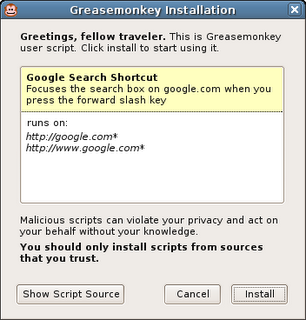
The new script installation UI is a bit of a change. When I first wrote Greasemonkey, it was intended to be for JavaScript hackers only. I didn't envision there even being a UI at first -- just some configuration files. But now that lots of non-programmers use Greasemonkey, displaying the source code when you click on a user script doesn't make much sense.

When you click on a user script now, it pops up an installation dialog that shows the title, description, and pages the script will be included on. If you want to see the source code, you can still do that by clicking "View Script Source" in the install dialog or in the user script's context menu.

Thursday, July 27, 2006

Greasemonkey 0.6.5 - 2.0 support and localization

I'm happy to announce Greasemonkey 0.6.5, which includes support for Firefox 2.0 beta 1 and basic localization in Czech, Dutch, and German. I've also fixed up the problems in the CVS main branch for people where were trying to use source directly.

Thanks to Chris Feldmann for internalization code, esquifit for a 2.0 compatibility patch, and all those who helped test.

Sunday, December 04, 2005

Workarounds for missing XMLHttpRequest, DOMParser, and XMLSerializer

Update: Over on the Greasemonkey mailing list, Joe la Poutre notices an even easier workaround. All you have to do is use the older form of the XPCNativeWrapper constructor to access a specific property. I'm not even sure why this works, but it does:

var parser = new XPCNativeWrapper(window, "DOMParser").DOMParser();
alert(parser.parseFromString("", "text/xml"));

Leaving the below, just for posterity...


One bittersweet part about releasing Greasemonkey 0.6.4 was that I needed to remove support for the XML Extras module which contains such goodies as XMLHttpRequest, DOMParser, and XMLSerializer.

I knew that many people were using XMLHttpRequest, particularly since GM_xmlhttpRequest, it's cross-domain replacement evaporated temporarily in 0.3.5, and that this would be a pain point. However, when weighing those people having to change their scripts to use GM_xmlhttpRequest and the alternative of having a confusingly inconsistent security model, I chose the former. I also fixed the major scripts I knew of, such as GMail Conversation Preview, which used XMLHttpRequest.

What I didn't expect at all was that people would miss DOMParser and XMLSerializer. I had no idea any scripts even used these. It's really neat to find people using pieces of your tool which you didn't expect them to, in ways you didn't expect them to. This makes me incredibly happy. Go user scripters! :-)

Anyway, to make a long story short, I've received many questions asking how to work around the lack of these two classes. The good news is that not only is there a workaround, there are three of them!

1. Use unsafeWindow.DOMParser and unsafeWindow.XMLSerializer

The downside here is that, as the name says, unsafeWindow is a reference to the content actual window - the same one that the content's JavaScript uses. Because of that, calling into it can make your script vulnerable to interference by the content script. This can be OK if you trust the site you are scripting somewhat. Take a look at the unsafeWindow details to decide whether you think this is appropriate for your script.

2. Use E4X

In a very zen turn of events it turns out that although Firefox 1.5 denies user scripters the XPCOM-based XML parsing and serializing they were accustomed to, it provides them with a brand-new - arguably superior - interface.

E4X is a brand new native JavaScript XML API that ships with Firefox 1.5 and is available to Greasemonkey scripts. There's not a ton of documentation yet, but from my experience with it so far, it's vastly more elegant and pleasant to work with than the DOM interfaces.

You can get more information about E4X, including the ECMA specification and a handy expression tester, at these URLs:

http://developer.mozilla.org/en/docs/E4X
http://www.ecma-international.org/publications/standards/Ecma-357.htm
http://www.linkwerk.com/pub/javascript/e4x/e4x-tester/

One caveat to keep in mind is that, in accordance with the E4X spec (don't ask me, it's insane), the input XML must not have an XML declaration. So you usually need to use a regex to strip it before parsing. For example:

var xml = new XML(xmlStringWithDecl.replace(/<\?xml.*?\?>/g, ""));


3. Use an IFRAME and let Mozilla do the dirty work

Many have pointed out that Mozilla already ships with an excellent, and very robust XML parser. It also ships with an HTML parser. Why not just leverage those? You can, it just takes a bit of hacking. I put an example of how to use an IFRAME to parse an HTML document into a DOM on my website.

Greasemonkey HTML Parser

Of course, just by changing the content type from text/html to text/xml, you could use the same technique to parse XHTML or even raw XML.


So I hope this shows that although the way to do certain things has changed, no capabilities have been removed from Greasemonkey. In fact new ones have been added, and the addition of completely isolating user scripts from content improved the reliability and security of Greasemonkey quite a lot.

Sorry for the disturbance, you may now resume your madcap exploration and use of Greasemonkey for all manner of things I never expected.

Mozdev back - Greasemonkey page updated

After some downtime due to increased load from the Firefox 1.5 release, mozdev is back. I took the opportunity to update the Greasemonkey homepage and authoring page.

Friday, December 02, 2005

Slides from Nov 8 Emerging Technology SIG

Last month I was asked to give a presentation about Greasemonkey at the Emerging Technology SIG here in Mountain View. I was bored with my old presentation format, so I redesigned it.

View the slides.

And here's the zipped package if you want to use the format for your own presentation.

The old format also had some issues. I found that personally, the more words that were on each slide, the more I was obligated to say on each slide. It made me uncomfortable, knowing that people would see if I didn't say something I had planned to.

My girlfriend, Susan, mentioned that I actually speak about Greasemonkey quite well off the cuff. So I stole an idea from other presentations I've seen and put very few words on each slide. I felt like this gave me more freedom to just talk - expanding on areas people seemed interested in, and skipping areas they didn't.

There is only a very vague structure to this presentation. It's divided into several high-level sections, and each section progresses through a few phases:
  • Question
  • Exploration, broad answers, more questions
  • Restate Question
  • Concise answer
I don't know if this is applicable to other presentations, but it seemed to work for Greasemonkey. Maybe Greasemonkey just has a lot of questions surrounding it :-).

Thursday, December 01, 2005

Broken Scripts Fixed

In abscense of the wiki-like features that Jesse is building into userscripts.org, I am keeping a list of scripts I have fixed for 0.6.4 at http://userscripts.org/fixes. I'll also post a comment on the userscripts.org page for the scripts when I make these changes.

I'll keep the script there until the author updates the original location and pings me. If you're having trouble with a script, send a mail to the mailing list, or leave a comment, and maybe I'll take a look.

Wednesday, November 30, 2005

Greasemonkey 0.6.4

It's been a long road, but a stable, secure, and much improved Greasemonkey is now available for Firefox 1.5.

Install Greasemonkey 0.6.4

This is for Firefox 1.5 only and will not install on previous Firefoxen. If you use a Firefox version prior to 1.5, you should continue using Greasemonkey 0.5.3.

Some of the changes required for security caused minor API changes. If you are a developer and your script breaks in Greasemonkey 0.6.4, consult the wiki for information on how to fix it. Or, as always, ask on the mailing list.


What's new since 0.5.x?

  • Monkey menu: Right-click on the monkey to get quick access to enable or disable the scripts which apply to this page.

  • New install UI: There's a cute new yellow install bar like the one that's displayed for extensions when you load a user script file. When you install, you get a simple animation in the status bar for the loading progress followed by a single dialog when installation is successful.

  • New injection system: We now use a much stabler injection system which is only available to Firefox 1.5. This should solve all double-injects or non-injects.

  • The document.domain bug which was causing scripts to not inject on sites such as myspace.com fixed.

  • New migration system: Greasemonkey no longer tries to migrate the script folder's location on install, which was causing install headaches for some users. Instead, it uses the old location if a previous version was already installed.

  • Fastback support: Previous Greasemonkeys interfered with Firefox 1.5's awesome Fastback feature. This release does not.

  • Remove script prefs when uninstalling the scripts. Sort of; see issues.


Known Issues:
  • When uninstalling scripts, the "also uninstall script preferences" checkbox looks works when "OK" is clicked, rather than when "uninstall" is clicked. In other words, before confirming uninstallation of scripts, make sure the checkbox is selected to also remove the associated prefs. This is needlessly confusing.

Monday, September 12, 2005

Firefox 1.5-compatible Greasemonkey beta now available

I've posted a beta of the next version of Greasemonkey to userscripts.org. You can access it at:

http://userscripts.org/greasemonkey-0.6.2.xpi

This is for Firefox Beta 1.5 only and will not install on other Firefoxes. If you use a version of the browser prior to 1.5, then you should continue using Greasemonkey 0.5.3.

It's a beta, which means that it will likely break some number of your existing, working scripts. Please report these on the mailing list and to the script author. Many breakages will be up to the script author to correct. Typically, the changes required are minor. Authors should consult the Greasemonkey Wiki or mailing list for help.

There is currently no Greasemonkey 0.5.x for Firefox 1.5 beta. It's my hope that user script authors will update their scripts so that such a release is not necessary. So please, bug script authors whose scripts break :-).


What's new?
  • Monkey menu: Click the monkey to get quick access to enabling and disabling each of your scripts. You can also see at a glance which scripts ran on the current page.

  • New install UI: We no longer pop up two modal dialogs everytime you install a script. Instead, a simple animated status message to the left of the monkey tells you everything went OK.

  • New injection system: We now use a much stabler injection system which is only available to Firefox 1.5. This should solve all double-injects or non-injects (except for document.domain issues discussed below).

  • New migration system: Greasemonkey no longer tries to migrate the script folder's location on install, which was causing install headaches for some users. Instead, it uses the old location if a previous version was already installed.

  • Fastback support: Previous Greasemonkeys interfered with Firefox 1.5's awesome Fastback feature. This release does not.

Known Issues:

  • Update: If you install Greasemonkey 0.6.2 without any prior version installed, installing scripts will not work. You'll see a "file not found error. We'll be updating soon to fix this and are sorry for the bug. Meanwhile, the following will fix you up:

    1. cd <your profile directory>

    2. mkdir gm_scripts

    3. Unix: touch gm_scripts/config.xml

    4. Windows: echo "" > gm_scripts\config.xml


  • Greasemonkey 0.6.2 does not inject on websites which use the document.domain javascript property. Notable examples are search.ebay.com and yahoo.com. This is due to a Firefox bug which will be fixed before 1.5 ships.

  • Scripts which use any of the properties of the location object fail with NS_ERROR_INVALID_POINTER. This is due to a Firefox bug which will be fixed before 1.5 ships. As a temporary workaround, script authors may wrap code which accesses the location object with a window.setTimeout call. So for instance, instead of window.location.replace('foo'), use window.setTimeout(function(){ window.location.replace('foo') });.

XPCNativeWrapper reminders:

The window and document properties in Greasemonkey 0.6.x are XPCNativeWrapper objects, which have many annoying limitations as compared to the normal DOM objects. You can keep up with all the details as documented on the Greasemonkey wiki.

Sunday, September 04, 2005

General update

This bug with migration which everyone keeps encountering is really frustrating. It occurs on a large percentage of machines, but not for any of the Greasemonkey developers. For anyone who is still seeing problems where GM appears to not work at all after upgrading to 0.5.x, please see the directions here for a simple fix.

I have created a patch which forgoes automatic migration completely and just warns the user that they need to move the folder by hand, but I'm not sure whether to push it yet. I suppose it depends on how many people who were using 0.3.x have not yet upgraded.

In other news, I've made quite a bit of progress on a new Greasemonkey - 0.6 - which uses a more stable injection technique which should solve a whole other class of problems. It works really well, is super simple, and uses standard APIs. So I don't expect it to have the same inconsistency across machines that the 0.5 series does.

Unless I keep getting a ton of reports about bad migrations, I think I'll just leave 0.5.3 as the last of that branch and focus on 0.6, which will not have auto-migration, and thus cannot have this nasty migration bug.

I guarantee that nobody is more frustrated by these bugs than me. But 0.6 should be a lot better. So just hang on, and we can all forget 0.5 as soon as possible :-).

Saturday, September 03, 2005

0.5.3 available

Though still in the review queue on mozilla update, 0.5.3 is available for download directly from userscripts.org right now.

This update solves the problems with migration from 0.3.5 that some people where having with 0.5.1. It also fixes the "Install User Script" menu item always available bug that pissed a lot of people off.


I'm still working on improving the injection system, which will solve all the random injection problems people are having. This will show up in Greasemonkey 0.6.

0.5.2 late

Somebody discovered a new injection issue (:: sigh ::) in 0.5.2, so I put it off slightly. I'll be rolling back that commit and then reposting it hopefully tonight.

These issues are highly personal, and seem to have to do with network connection, cpu speed, etc. Which is why I'm moving Greasemonkey back to a simpler injection system which should be more fool-proof.

Many people are using 0.5.x without trouble (everyone who tested the alphas on the mailing list, for example). For those of you for whom it isn't, I'm not ignoring you. The next version of Greasemonkey should work much better.

Thursday, September 01, 2005

0.3.5 -> 0.5.1 migration madness

There is a bug in the migration code for Greasemonkey 0.5.1 which is affecting some windows users. 0.5.2 fixes this issue, and has been circulated through the mailing list and is looking good, but I won't be able to post it until tonight.

If you want to fix your 0.5.1, I don't think it's a good idea to edit the profile files directly unless you really know what you're doing. Instead, these steps should fix most people's corruption.
  • Shut down Firefox.
  • Find your profile directory
  • Move profileDir/extensions/{e4a8a97b-f2ed-450b-b12d-ee082ba24781}/chrome/
    greasemonkey/content/scripts/ to profileDir/scripts.
  • Remove profileDir/gm_scripts if it exists
  • Rename profileDir/scripts to profileDir/gm_scripts
  • Restart Firefox

Thursday, August 25, 2005

Greasemonkey 0.5.1 Final

Huzzah!

Greasemonkey 0.5.1 Final is available for download.

Special thanks to "t" for reporting a user script escalation issue in the previous beta which has now been fixed.

Other changes:
  • Bug 10107 - Allow users to select a script editor. This also allows script editing to work for *nix users.
  • Bug 11214 - Clicking "Edit" in Manager loses enable/disable changes
  • Bug 11224 - Grease monkey doesn't accept non english characters!
  • Bug 11236 - The install context menu won't show if there's a node under the A element

Sunday, August 21, 2005

Gmail Preview

Mihai rocking with another great Greasemonkey script for Gmail. This one adds full preview to your inbox items. Very smooth, a definite install.

Saturday, August 06, 2005

Aaron's OSCON 2005 slides

Some people who were at OSCON and saw my presentation asked if they would be able to get the slides online.

I've posted them to my website
. You can also download them.

OSCON was a lot of fun. Here's what I've been able to learn about Portland:
  • People: very friendly
  • summer weather: great
  • public transport: efficient and clean
  • food: superb
  • Montage: recommended
  • Burnside skaters: insane
  • Nightlife: very amusing
  • Books: available
So in general, utopia. A fine place for a nerd conference.

Tuesday, August 02, 2005

Mozdev down

It would appear that mozdev.org - which generously hosts Greasemonkey's website - is down today.

Luckily, the Greasemonkey installer is not actually hosted on mozdev. So you can still install Greasemonkey by going directly there.