
- Do not inject scripts into file: and about: URLs by default, for security reasons. (#1000)
- The GM_openInTab() function respects the background loading tab behavior from Firefox preferences. (#1003)
- Specify label/control associations in "New Script" dialog, for accessibility. (#1010)
- Minor code clean ups and improvements. (#1011, #1020)
- Remove "forced" upgrade code. (#1013)
- Remove extra spacing around the status bar icon. (#1014)
- When adding include/exclude rules, include the port number in the default suggestion. (#1015)
- Reduce noise logged to the console when interacting with Firebug. (#1018)
- Apply security checks to GM_listValues() and GM_deleteValue(). (#1019)
- Fix missing localized strings in various locales. (#1022)
- Grease pages loaded into the sidebar. (#1023)
- Allow user scripts to access the latest available JavaScript engine. (#1026)
Saturday, September 26, 2009
Greasemonkey "0.8.2" Released
The latest version of Greasemonkey, "0.8.2" (full version: 0.8.20090920.2) has been uploaded to AMO. It includes the following changes:


Friday, September 18, 2009
Who Uses Greasemonkey, Part 2
I'd like to follow up my earlier post, analyzing which browsers Greasemonkey is used in. This time, a view on the operating systems where Greasemonkey is used. This is generally less interesting information -- it closely mirrors the market share of the OSes. But it's one more bit of detail we can derive from the AMO stats.
 This graph probably isn't very surprising. It shows that Mac has become more popular in the last year. Some detail on the last four weeks:
 Another view on the same detail. The exact underlying numbers involved:
Like I said at the beginning, generally the breakdown of the operating systems in general. Even so, the eight or nine percent of users on Mac or Linux make up nearly a quarter of a million users.
Like before, the numbers and charts are visible on Google Docs. No script this time, the work was easy enough to do by hand.
 This graph probably isn't very surprising. It shows that Mac has become more popular in the last year. Some detail on the last four weeks:
 Another view on the same detail. The exact underlying numbers involved:
| OS | Users | Percent |
|---|---|---|
| Windows | 2531829 | 91.50% |
| Mac | 164282 | 5.94% |
| Linux | 69186 | 2.50% |
| Other | 1690 | 0.06% |
Like I said at the beginning, generally the breakdown of the operating systems in general. Even so, the eight or nine percent of users on Mac or Linux make up nearly a quarter of a million users.
Like before, the numbers and charts are visible on Google Docs. No script this time, the work was easy enough to do by hand.
Saturday, September 05, 2009
Who Uses Greasemonkey?
As Johan and I begin to take over development of Greasemonkey, one of the important questions we need to answer is: which platforms should we support? We can inform this decision with some of the usage statistics that Mozilla Add-Ons gathers.
The statistics page for Greasemonkey is visible to everyone. The raw data is even available for download. But it can be hard to read, due to the level of detail and formatting that is applied. So, I've taken the time to analyze it carefully. The first interesting thing that we can see is the usage trends over time:
 (Looks like Mozilla had a reporting issue around May of 2009.)
I've also made a pie-graph of app usage, for the average values of the past 4 weeks:
 That pie chart represents these numbers:
So, let's say first off: we know this is a bad measurement. There's (almost) no "other" because there's no official support for other platforms, so only third party alterations make this usage possible. Thus, this data doesn't help us answer (i.e.) "Should we support Flock?" or "Should we support SongBird?".
It does let us know a little bit about what versions of Firefox we should support. All of 1.0 and 1.5 make up only 0.23% of the user base. Firefox 3.0 and 3.5 make up 95.44% of the user base. Firefox 2, however, makes up 4.31% of the user base. That's a much harder call.
Hackers: The raw data and charts behind this post is available on Google Docs. You can also see the python script that turned AMO's raw data into this presentation.
The statistics page for Greasemonkey is visible to everyone. The raw data is even available for download. But it can be hard to read, due to the level of detail and formatting that is applied. So, I've taken the time to analyze it carefully. The first interesting thing that we can see is the usage trends over time:
 (Looks like Mozilla had a reporting issue around May of 2009.)
I've also made a pie-graph of app usage, for the average values of the past 4 weeks:
 That pie chart represents these numbers:
| App | Users | Percent |
|---|---|---|
| Firefox/<=1.0 | 598 | 0.02% |
| Firefox/1.5 | 5502 | 0.21% |
| Firefox/2.0 | 113921 | 4.31% |
| Firefox/3.0 | 1470584 | 55.70% |
| Firefox/>=3.5 | 1049092 | 39.74% |
| Other | 446 | 0.02% |
So, let's say first off: we know this is a bad measurement. There's (almost) no "other" because there's no official support for other platforms, so only third party alterations make this usage possible. Thus, this data doesn't help us answer (i.e.) "Should we support Flock?" or "Should we support SongBird?".
It does let us know a little bit about what versions of Firefox we should support. All of 1.0 and 1.5 make up only 0.23% of the user base. Firefox 3.0 and 3.5 make up 95.44% of the user base. Firefox 2, however, makes up 4.31% of the user base. That's a much harder call.
Hackers: The raw data and charts behind this post is available on Google Docs. You can also see the python script that turned AMO's raw data into this presentation.
Wednesday, August 26, 2009
Greasemonkey Lives At GitHub
Months ago, the people running DevjaVu let us know that they were shutting the service down. It's unfortunate, but they cannot be faulted. They're still running now, but there's no saying how long that will remain for. As of today, the ability to change tickets (both creating and commenting, for all but pre-existing project members) has been revoked.
Greasemonkey now lives at GitHub, both for source code hosting, and issue tracking. We expect that the distributed nature of git should allow freer forking and branching, and easier collaboration with anyone; rather than the limited set of people who were granted SVN commit access, in earlier days.
If you notice any existing links outside of DevjaVu pointing into it, please let us know at the greasemonkey-dev mailing list. If you see someone suggesting the DevjaVu site, please correct them and let everyone involved know that GitHub is now the official code and issue host for Greasemonkey.
Thanks, and if you want to contribute, send those pull requests!
Greasemonkey now lives at GitHub, both for source code hosting, and issue tracking. We expect that the distributed nature of git should allow freer forking and branching, and easier collaboration with anyone; rather than the limited set of people who were granted SVN commit access, in earlier days.
If you notice any existing links outside of DevjaVu pointing into it, please let us know at the greasemonkey-dev mailing list. If you see someone suggesting the DevjaVu site, please correct them and let everyone involved know that GitHub is now the official code and issue host for Greasemonkey.
Thanks, and if you want to contribute, send those pull requests!
Sunday, August 23, 2009
Outie
[This is a repost of a message I also sent to greasemonkey-dev]
It's been a long time since I've been working on Greasemonkey actively. During the time I was away Johan Sundström and Anthony Lieuallen picked up the slack and did the last few releases without my help.
So I've decided to officially hand over the reins to them. What this means practically is that they will be the ones accepting patches, doing releases, and tending the bugs. I also hope that this change will reinvigorate the project, as it has been moving slowly for some time.
I'll still be lurking of course, but Johan and Anthony will be responsible for day-to-day administration now. I know they'll do a great job.
Monday, January 05, 2009
Greasemonkey Release 0.8.20090123.1
In preparation for Firefox 3.1, we're releasing a new version of Greasemonkey, marked as compatible with Firefox 3.1b2, along with additional changes and fixes:
- Added translations: ar-SA, bn-IN, hu-HU, id-ID, ro-RO, sr-RS, vi-VN.
- Fix for ticket #111 (anomalous separators in the monkey menu).
- Add GM_deleteValue() and GM_listValues() APIs (#38).
- Restore the anonymous function wrapper around scripts, and thus the same behavior as versions prior to 0.8 (by default, removable with the @unwrap metadata imperative, #108).
- Improved interaction with the Firebug console (#122, #204).
Thursday, June 12, 2008
Greasemonkey Version 0.8
At long last, the new version of Greasemonkey is available. Get Greasemonkey 0.8.0 from addons.mozilla.org.
The most important change for this release is full compatibility with Firefox 3.0. There is also a new feature that allows modularization of user scripts that comes in four pieces: @resource, @require, GM_getResourceURL, and GM_getResourceText. Follow those links to learn how they work. Also:
The most important change for this release is full compatibility with Firefox 3.0. There is also a new feature that allows modularization of user scripts that comes in four pieces: @resource, @require, GM_getResourceURL, and GM_getResourceText. Follow those links to learn how they work. Also:
- GM_xmlhttpRequest now includes the finalUrl property.
- Internal code quality improvements
- New attractive graphics by Pak-Kei Mak
Monday, January 21, 2008
Greasemonkey Security Update
I've just posted an update to Greasemonkey that fixes a recent publicly disclosed security issue. Please upgrade to the latest version as soon as possible.
Note that this update might affect compatibility for a small number of scripts. Script authors should see the Greasemonkey wiki for details and workarounds.
I have also enabled support for Firefox 3 Beta in this build for those who have been asking about that.
Thanks, and sorry for any inconvenience. For help or questions about Greasemonkey, join the greasemonkey-users mailing list.
To report security issues, please mail the details to greasemonkey-admins@googlegroups.com.
Note that this update might affect compatibility for a small number of scripts. Script authors should see the Greasemonkey wiki for details and workarounds.
I have also enabled support for Firefox 3 Beta in this build for those who have been asking about that.
Thanks, and sorry for any inconvenience. For help or questions about Greasemonkey, join the greasemonkey-users mailing list.
To report security issues, please mail the details to greasemonkey-admins@googlegroups.com.
Thursday, May 24, 2007
Greasemonkey 0.7 Candidate
Hello all,
Since there were some pretty major problems with the last release that caused significant grief, I've rethought how releases will work. Going forward, we will:
There are no new features other than bug fixes for the previous release. In particular:
Thanks for your patience!
Install Greasemonkey 0.7 Candidate
Since there were some pretty major problems with the last release that caused significant grief, I've rethought how releases will work. Going forward, we will:
- Do candidate releases to greasemonkey-dev and greasemonkey-users. Before, we just sent candidates to greasemonkey-dev. If you are interested in cutting edge builds and don't mind getting a little messy in the process, subscribe to one of these lists. This will get more eyes on finding regressions early.
- Once the candidate is vetted on the mailing lists, we will do a candidate release on this blog.
- Only once the candidate is vetted on the mailing lists and the blog will we do an autoudpate.
There are no new features other than bug fixes for the previous release. In particular:
- Fixed the bug where you can't install scripts if you have never disabled Greasemonkey.
- Fixed the bug where drag and drop in the manage dialog only works once per view.
- Fixed the bug where removing a script in the manage dialog also removes the last script.
Thanks for your patience!
Install Greasemonkey 0.7 Candidate
Wednesday, May 09, 2007
Greasemonkey 0.6.9: gm_scripts directory bug gone forever?
Download Greasemonkey 0.6.9
Anthony has made a change in this release which will hopefully end the issue which keeps popping up of the gm_scripts directory not existing.
Other interesting bits in this release:
Full change log here
Anthony has made a change in this release which will hopefully end the issue which keeps popping up of the gm_scripts directory not existing.
Other interesting bits in this release:
- You can now reorder the scripts in the manage dialog with drag+drop or the arrow keys
- You can now use Firebug's
consoleobject to debug Greasemonkey if you have Firebug installed.
- Fix bug where install dialog would pop up when Greasemonkey is disabled
Full change log here
Saturday, March 17, 2007
Greasemonkey 0.6.8: 'New Script...' UI now usable, error reporting improvements, new localizations
Download Greasemonkey 0.6.8.20070314.0
Note: Because addons.mozilla.org is in the midst of a migration to a new version of their software, Greasemonkey will not autoupdate itself until at least March 22, when we are told the new version of their server will up and running.
So if you want this version, you need to download it manually until then.
===
New stuff in this release. The major things are:
To see the full list of changes in this release, see the commit history.
Note: Because addons.mozilla.org is in the midst of a migration to a new version of their software, Greasemonkey will not autoupdate itself until at least March 22, when we are told the new version of their server will up and running.
So if you want this version, you need to download it manually until then.
===
New stuff in this release. The major things are:
- Rewrite of 'New Script...' UI. It now pops up a nice UI to get the script details and then generates and opens a script which is already installed that you can edit in one step. This is a huge improvement in the usability of this feature. Thanks to Anthony Lieuallen for the implementation.
- Improvements to error reporting. Most types of errors in user scripts now give the correct line number in the error message. You can also click on the filename in Firebug to view the script, as with other types of errors in Firefox. Anthony is also responsible for this improvement.
- Added support for overrideMimeType to GM_xmlhttpRequest. Thanks to Lior Zur for the patch. To use, add overrideMimeType: "yourmimetypehere" to the object you pass to GM_xmlhttpRequest.
- New translations for Finnish, Japanese, and Russian. The Greasemonkey UI looks particularly cool in Japanese. Thanks to Tommi Rautava, Hisateru Tanaka, and Александр Соколов for their contributions.
To see the full list of changes in this release, see the commit history.
Friday, February 23, 2007
Web page changes
I've made a series of changes to try and organize the various webpages related to Greasemonkey.
- www.greasespot.net is Greasemonkey's new home. It hosts this blog as well as links to download, userscripts.org, Dive into Greasemonkey, discussion groups, wiki, and dev site. greaseblog.blogspot.com now redirects here.
- wiki.greasespot.net now has a wiki that we can use for troubleshooting, etc. Thanks to Anthony Lieuallen for hosting this.
- greasemonkey.devjavu.com is the new home of Greasemonkey development, including source code.
- greasemonkey.mozdev.org is now archived and redirects here.
Wednesday, February 07, 2007
Greasemonkey 0.6.7: minor UI tweaks + new localizations
Greasemonkey 0.6.7.20070131.0 is now available for download.
There were only minor changes since 0.6.6:
Also, we are going to start doing regular releases of Greasemonkey every month, so long as there is new stuff checked in. The build will be created on the first Thursday of each month and sent to the greasemonkey-dev mailing list for trial. Once verified, it will be posted to addons.mozilla.org.
There were only minor changes since 0.6.6:
- Fixed the manage dialog so that it doesn't bounce around when you select different user scripts (thanks Anthony Lieuallen)
- Added Basque translation (thanks 3ARRANO)
- Updated German translation (thanks Matthias Bauer)
- Middle-click on monkey icon now opens manage dialog, right-click on scripts in monkey menu opens them in an editor (thanks LouCypher and pile0nades)
Also, we are going to start doing regular releases of Greasemonkey every month, so long as there is new stuff checked in. The build will be created on the first Thursday of each month and sent to the greasemonkey-dev mailing list for trial. Once verified, it will be posted to addons.mozilla.org.
Tuesday, October 17, 2006
Fix for Spanish localization bug
Version 0.6.6.20061017.0 is available and fixes the bug that you may have noticed if you speak Spanish.
Download it now, or wait for autoupdate to prompt you.
Download it now, or wait for autoupdate to prompt you.
Monday, October 16, 2006
Greasemonkey 0.6.6 - Firefox 2 support and new install UI
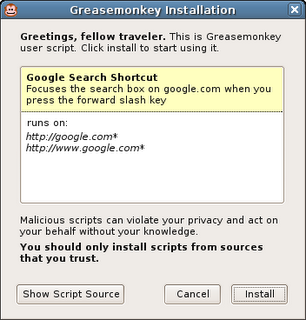
Download here, or wait for Firefox 2's cool new extension autoupdater to prompt you.
The main changes from 0.6.5 are:
- Firefox 2.0 support
- New, less crappy script installation UI
- Spanish localization
When you click on a user script now, it pops up an installation dialog that shows the title, description, and pages the script will be included on. If you want to see the source code, you can still do that by clicking "View Script Source" in the install dialog or in the user script's context menu.
Thursday, July 27, 2006
Greasemonkey 0.6.5 - 2.0 support and localization
I'm happy to announce Greasemonkey 0.6.5, which includes support for Firefox 2.0 beta 1 and basic localization in Czech, Dutch, and German. I've also fixed up the problems in the CVS main branch for people where were trying to use source directly.
Thanks to Chris Feldmann for internalization code, esquifit for a 2.0 compatibility patch, and all those who helped test.
Thanks to Chris Feldmann for internalization code, esquifit for a 2.0 compatibility patch, and all those who helped test.
Sunday, December 04, 2005
Workarounds for missing XMLHttpRequest, DOMParser, and XMLSerializer
Update: Over on the Greasemonkey mailing list, Joe la Poutre notices an even easier workaround. All you have to do is use the older form of the XPCNativeWrapper constructor to access a specific property. I'm not even sure why this works, but it does:
Leaving the below, just for posterity...
One bittersweet part about releasing Greasemonkey 0.6.4 was that I needed to remove support for the XML Extras module which contains such goodies as XMLHttpRequest, DOMParser, and XMLSerializer.
I knew that many people were using XMLHttpRequest, particularly since GM_xmlhttpRequest, it's cross-domain replacement evaporated temporarily in 0.3.5, and that this would be a pain point. However, when weighing those people having to change their scripts to use GM_xmlhttpRequest and the alternative of having a confusingly inconsistent security model, I chose the former. I also fixed the major scripts I knew of, such as GMail Conversation Preview, which used XMLHttpRequest.
What I didn't expect at all was that people would miss DOMParser and XMLSerializer. I had no idea any scripts even used these. It's really neat to find people using pieces of your tool which you didn't expect them to, in ways you didn't expect them to. This makes me incredibly happy. Go user scripters! :-)
Anyway, to make a long story short, I've received many questions asking how to work around the lack of these two classes. The good news is that not only is there a workaround, there are three of them!
1. Use unsafeWindow.DOMParser and unsafeWindow.XMLSerializer
The downside here is that, as the name says, unsafeWindow is a reference to the content actual window - the same one that the content's JavaScript uses. Because of that, calling into it can make your script vulnerable to interference by the content script. This can be OK if you trust the site you are scripting somewhat. Take a look at the unsafeWindow details to decide whether you think this is appropriate for your script.
2. Use E4X
In a very zen turn of events it turns out that although Firefox 1.5 denies user scripters the XPCOM-based XML parsing and serializing they were accustomed to, it provides them with a brand-new - arguably superior - interface.
E4X is a brand new native JavaScript XML API that ships with Firefox 1.5 and is available to Greasemonkey scripts. There's not a ton of documentation yet, but from my experience with it so far, it's vastly more elegant and pleasant to work with than the DOM interfaces.
You can get more information about E4X, including the ECMA specification and a handy expression tester, at these URLs:
http://developer.mozilla.org/en/docs/E4X
http://www.ecma-international.org/publications/standards/Ecma-357.htm
http://www.linkwerk.com/pub/javascript/e4x/e4x-tester/
One caveat to keep in mind is that, in accordance with the E4X spec (don't ask me, it's insane), the input XML must not have an XML declaration. So you usually need to use a regex to strip it before parsing. For example:
3. Use an IFRAME and let Mozilla do the dirty work
Many have pointed out that Mozilla already ships with an excellent, and very robust XML parser. It also ships with an HTML parser. Why not just leverage those? You can, it just takes a bit of hacking. I put an example of how to use an IFRAME to parse an HTML document into a DOM on my website.
Greasemonkey HTML Parser
Of course, just by changing the content type from text/html to text/xml, you could use the same technique to parse XHTML or even raw XML.
So I hope this shows that although the way to do certain things has changed, no capabilities have been removed from Greasemonkey. In fact new ones have been added, and the addition of completely isolating user scripts from content improved the reliability and security of Greasemonkey quite a lot.
Sorry for the disturbance, you may now resume your madcap exploration and use of Greasemonkey for all manner of things I never expected.
var parser = new XPCNativeWrapper(window, "DOMParser").DOMParser();
alert(parser.parseFromString("", "text/xml"));
Leaving the below, just for posterity...
One bittersweet part about releasing Greasemonkey 0.6.4 was that I needed to remove support for the XML Extras module which contains such goodies as XMLHttpRequest, DOMParser, and XMLSerializer.
I knew that many people were using XMLHttpRequest, particularly since GM_xmlhttpRequest, it's cross-domain replacement evaporated temporarily in 0.3.5, and that this would be a pain point. However, when weighing those people having to change their scripts to use GM_xmlhttpRequest and the alternative of having a confusingly inconsistent security model, I chose the former. I also fixed the major scripts I knew of, such as GMail Conversation Preview, which used XMLHttpRequest.
What I didn't expect at all was that people would miss DOMParser and XMLSerializer. I had no idea any scripts even used these. It's really neat to find people using pieces of your tool which you didn't expect them to, in ways you didn't expect them to. This makes me incredibly happy. Go user scripters! :-)
Anyway, to make a long story short, I've received many questions asking how to work around the lack of these two classes. The good news is that not only is there a workaround, there are three of them!
1. Use unsafeWindow.DOMParser and unsafeWindow.XMLSerializer
The downside here is that, as the name says, unsafeWindow is a reference to the content actual window - the same one that the content's JavaScript uses. Because of that, calling into it can make your script vulnerable to interference by the content script. This can be OK if you trust the site you are scripting somewhat. Take a look at the unsafeWindow details to decide whether you think this is appropriate for your script.
2. Use E4X
In a very zen turn of events it turns out that although Firefox 1.5 denies user scripters the XPCOM-based XML parsing and serializing they were accustomed to, it provides them with a brand-new - arguably superior - interface.
E4X is a brand new native JavaScript XML API that ships with Firefox 1.5 and is available to Greasemonkey scripts. There's not a ton of documentation yet, but from my experience with it so far, it's vastly more elegant and pleasant to work with than the DOM interfaces.
You can get more information about E4X, including the ECMA specification and a handy expression tester, at these URLs:
http://developer.mozilla.org/en/docs/E4X
http://www.ecma-international.org/publications/standards/Ecma-357.htm
http://www.linkwerk.com/pub/javascript/e4x/e4x-tester/
One caveat to keep in mind is that, in accordance with the E4X spec (don't ask me, it's insane), the input XML must not have an XML declaration. So you usually need to use a regex to strip it before parsing. For example:
var xml = new XML(xmlStringWithDecl.replace(/<\?xml.*?\?>/g, ""));
3. Use an IFRAME and let Mozilla do the dirty work
Many have pointed out that Mozilla already ships with an excellent, and very robust XML parser. It also ships with an HTML parser. Why not just leverage those? You can, it just takes a bit of hacking. I put an example of how to use an IFRAME to parse an HTML document into a DOM on my website.
Greasemonkey HTML Parser
Of course, just by changing the content type from text/html to text/xml, you could use the same technique to parse XHTML or even raw XML.
So I hope this shows that although the way to do certain things has changed, no capabilities have been removed from Greasemonkey. In fact new ones have been added, and the addition of completely isolating user scripts from content improved the reliability and security of Greasemonkey quite a lot.
Sorry for the disturbance, you may now resume your madcap exploration and use of Greasemonkey for all manner of things I never expected.
Mozdev back - Greasemonkey page updated
After some downtime due to increased load from the Firefox 1.5 release, mozdev is back. I took the opportunity to update the Greasemonkey homepage and authoring page.
Friday, December 02, 2005
Slides from Nov 8 Emerging Technology SIG
Last month I was asked to give a presentation about Greasemonkey at the Emerging Technology SIG here in Mountain View. I was bored with my old presentation format, so I redesigned it.
View the slides.
And here's the zipped package if you want to use the format for your own presentation.
The old format also had some issues. I found that personally, the more words that were on each slide, the more I was obligated to say on each slide. It made me uncomfortable, knowing that people would see if I didn't say something I had planned to.
My girlfriend, Susan, mentioned that I actually speak about Greasemonkey quite well off the cuff. So I stole an idea from other presentations I've seen and put very few words on each slide. I felt like this gave me more freedom to just talk - expanding on areas people seemed interested in, and skipping areas they didn't.
There is only a very vague structure to this presentation. It's divided into several high-level sections, and each section progresses through a few phases:
View the slides.
And here's the zipped package if you want to use the format for your own presentation.
The old format also had some issues. I found that personally, the more words that were on each slide, the more I was obligated to say on each slide. It made me uncomfortable, knowing that people would see if I didn't say something I had planned to.
My girlfriend, Susan, mentioned that I actually speak about Greasemonkey quite well off the cuff. So I stole an idea from other presentations I've seen and put very few words on each slide. I felt like this gave me more freedom to just talk - expanding on areas people seemed interested in, and skipping areas they didn't.
There is only a very vague structure to this presentation. It's divided into several high-level sections, and each section progresses through a few phases:
- Question
- Exploration, broad answers, more questions
- Restate Question
- Concise answer
Thursday, December 01, 2005
Broken Scripts Fixed
In abscense of the wiki-like features that Jesse is building into userscripts.org, I am keeping a list of scripts I have fixed for 0.6.4 at http://userscripts.org/fixes. I'll also post a comment on the userscripts.org page for the scripts when I make these changes.
I'll keep the script there until the author updates the original location and pings me. If you're having trouble with a script, send a mail to the mailing list, or leave a comment, and maybe I'll take a look.
I'll keep the script there until the author updates the original location and pings me. If you're having trouble with a script, send a mail to the mailing list, or leave a comment, and maybe I'll take a look.
Subscribe to:
Posts (Atom)
