
Version 0.6.6.20061017.0 is available and fixes the bug that you may have noticed if you speak Spanish.
Download it now, or wait for autoupdate to prompt you.
Tuesday, October 17, 2006


Monday, October 16, 2006
Greasemonkey 0.6.6 - Firefox 2 support and new install UI
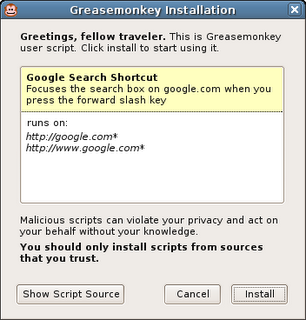
Download here, or wait for Firefox 2's cool new extension autoupdater to prompt you.
The main changes from 0.6.5 are:
- Firefox 2.0 support
- New, less crappy script installation UI
- Spanish localization
When you click on a user script now, it pops up an installation dialog that shows the title, description, and pages the script will be included on. If you want to see the source code, you can still do that by clicking "View Script Source" in the install dialog or in the user script's context menu.
Thursday, July 27, 2006
Greasemonkey 0.6.5 - 2.0 support and localization
I'm happy to announce Greasemonkey 0.6.5, which includes support for Firefox 2.0 beta 1 and basic localization in Czech, Dutch, and German. I've also fixed up the problems in the CVS main branch for people where were trying to use source directly.
Thanks to Chris Feldmann for internalization code, esquifit for a 2.0 compatibility patch, and all those who helped test.
Thanks to Chris Feldmann for internalization code, esquifit for a 2.0 compatibility patch, and all those who helped test.
Sunday, December 04, 2005
Workarounds for missing XMLHttpRequest, DOMParser, and XMLSerializer
Update: Over on the Greasemonkey mailing list, Joe la Poutre notices an even easier workaround. All you have to do is use the older form of the XPCNativeWrapper constructor to access a specific property. I'm not even sure why this works, but it does:
Leaving the below, just for posterity...
One bittersweet part about releasing Greasemonkey 0.6.4 was that I needed to remove support for the XML Extras module which contains such goodies as XMLHttpRequest, DOMParser, and XMLSerializer.
I knew that many people were using XMLHttpRequest, particularly since GM_xmlhttpRequest, it's cross-domain replacement evaporated temporarily in 0.3.5, and that this would be a pain point. However, when weighing those people having to change their scripts to use GM_xmlhttpRequest and the alternative of having a confusingly inconsistent security model, I chose the former. I also fixed the major scripts I knew of, such as GMail Conversation Preview, which used XMLHttpRequest.
What I didn't expect at all was that people would miss DOMParser and XMLSerializer. I had no idea any scripts even used these. It's really neat to find people using pieces of your tool which you didn't expect them to, in ways you didn't expect them to. This makes me incredibly happy. Go user scripters! :-)
Anyway, to make a long story short, I've received many questions asking how to work around the lack of these two classes. The good news is that not only is there a workaround, there are three of them!
1. Use unsafeWindow.DOMParser and unsafeWindow.XMLSerializer
The downside here is that, as the name says, unsafeWindow is a reference to the content actual window - the same one that the content's JavaScript uses. Because of that, calling into it can make your script vulnerable to interference by the content script. This can be OK if you trust the site you are scripting somewhat. Take a look at the unsafeWindow details to decide whether you think this is appropriate for your script.
2. Use E4X
In a very zen turn of events it turns out that although Firefox 1.5 denies user scripters the XPCOM-based XML parsing and serializing they were accustomed to, it provides them with a brand-new - arguably superior - interface.
E4X is a brand new native JavaScript XML API that ships with Firefox 1.5 and is available to Greasemonkey scripts. There's not a ton of documentation yet, but from my experience with it so far, it's vastly more elegant and pleasant to work with than the DOM interfaces.
You can get more information about E4X, including the ECMA specification and a handy expression tester, at these URLs:
http://developer.mozilla.org/en/docs/E4X
http://www.ecma-international.org/publications/standards/Ecma-357.htm
http://www.linkwerk.com/pub/javascript/e4x/e4x-tester/
One caveat to keep in mind is that, in accordance with the E4X spec (don't ask me, it's insane), the input XML must not have an XML declaration. So you usually need to use a regex to strip it before parsing. For example:
3. Use an IFRAME and let Mozilla do the dirty work
Many have pointed out that Mozilla already ships with an excellent, and very robust XML parser. It also ships with an HTML parser. Why not just leverage those? You can, it just takes a bit of hacking. I put an example of how to use an IFRAME to parse an HTML document into a DOM on my website.
Greasemonkey HTML Parser
Of course, just by changing the content type from text/html to text/xml, you could use the same technique to parse XHTML or even raw XML.
So I hope this shows that although the way to do certain things has changed, no capabilities have been removed from Greasemonkey. In fact new ones have been added, and the addition of completely isolating user scripts from content improved the reliability and security of Greasemonkey quite a lot.
Sorry for the disturbance, you may now resume your madcap exploration and use of Greasemonkey for all manner of things I never expected.
var parser = new XPCNativeWrapper(window, "DOMParser").DOMParser();
alert(parser.parseFromString("", "text/xml"));
Leaving the below, just for posterity...
One bittersweet part about releasing Greasemonkey 0.6.4 was that I needed to remove support for the XML Extras module which contains such goodies as XMLHttpRequest, DOMParser, and XMLSerializer.
I knew that many people were using XMLHttpRequest, particularly since GM_xmlhttpRequest, it's cross-domain replacement evaporated temporarily in 0.3.5, and that this would be a pain point. However, when weighing those people having to change their scripts to use GM_xmlhttpRequest and the alternative of having a confusingly inconsistent security model, I chose the former. I also fixed the major scripts I knew of, such as GMail Conversation Preview, which used XMLHttpRequest.
What I didn't expect at all was that people would miss DOMParser and XMLSerializer. I had no idea any scripts even used these. It's really neat to find people using pieces of your tool which you didn't expect them to, in ways you didn't expect them to. This makes me incredibly happy. Go user scripters! :-)
Anyway, to make a long story short, I've received many questions asking how to work around the lack of these two classes. The good news is that not only is there a workaround, there are three of them!
1. Use unsafeWindow.DOMParser and unsafeWindow.XMLSerializer
The downside here is that, as the name says, unsafeWindow is a reference to the content actual window - the same one that the content's JavaScript uses. Because of that, calling into it can make your script vulnerable to interference by the content script. This can be OK if you trust the site you are scripting somewhat. Take a look at the unsafeWindow details to decide whether you think this is appropriate for your script.
2. Use E4X
In a very zen turn of events it turns out that although Firefox 1.5 denies user scripters the XPCOM-based XML parsing and serializing they were accustomed to, it provides them with a brand-new - arguably superior - interface.
E4X is a brand new native JavaScript XML API that ships with Firefox 1.5 and is available to Greasemonkey scripts. There's not a ton of documentation yet, but from my experience with it so far, it's vastly more elegant and pleasant to work with than the DOM interfaces.
You can get more information about E4X, including the ECMA specification and a handy expression tester, at these URLs:
http://developer.mozilla.org/en/docs/E4X
http://www.ecma-international.org/publications/standards/Ecma-357.htm
http://www.linkwerk.com/pub/javascript/e4x/e4x-tester/
One caveat to keep in mind is that, in accordance with the E4X spec (don't ask me, it's insane), the input XML must not have an XML declaration. So you usually need to use a regex to strip it before parsing. For example:
var xml = new XML(xmlStringWithDecl.replace(/<\?xml.*?\?>/g, ""));
3. Use an IFRAME and let Mozilla do the dirty work
Many have pointed out that Mozilla already ships with an excellent, and very robust XML parser. It also ships with an HTML parser. Why not just leverage those? You can, it just takes a bit of hacking. I put an example of how to use an IFRAME to parse an HTML document into a DOM on my website.
Greasemonkey HTML Parser
Of course, just by changing the content type from text/html to text/xml, you could use the same technique to parse XHTML or even raw XML.
So I hope this shows that although the way to do certain things has changed, no capabilities have been removed from Greasemonkey. In fact new ones have been added, and the addition of completely isolating user scripts from content improved the reliability and security of Greasemonkey quite a lot.
Sorry for the disturbance, you may now resume your madcap exploration and use of Greasemonkey for all manner of things I never expected.
Mozdev back - Greasemonkey page updated
After some downtime due to increased load from the Firefox 1.5 release, mozdev is back. I took the opportunity to update the Greasemonkey homepage and authoring page.
Friday, December 02, 2005
Slides from Nov 8 Emerging Technology SIG
Last month I was asked to give a presentation about Greasemonkey at the Emerging Technology SIG here in Mountain View. I was bored with my old presentation format, so I redesigned it.
View the slides.
And here's the zipped package if you want to use the format for your own presentation.
The old format also had some issues. I found that personally, the more words that were on each slide, the more I was obligated to say on each slide. It made me uncomfortable, knowing that people would see if I didn't say something I had planned to.
My girlfriend, Susan, mentioned that I actually speak about Greasemonkey quite well off the cuff. So I stole an idea from other presentations I've seen and put very few words on each slide. I felt like this gave me more freedom to just talk - expanding on areas people seemed interested in, and skipping areas they didn't.
There is only a very vague structure to this presentation. It's divided into several high-level sections, and each section progresses through a few phases:
View the slides.
And here's the zipped package if you want to use the format for your own presentation.
The old format also had some issues. I found that personally, the more words that were on each slide, the more I was obligated to say on each slide. It made me uncomfortable, knowing that people would see if I didn't say something I had planned to.
My girlfriend, Susan, mentioned that I actually speak about Greasemonkey quite well off the cuff. So I stole an idea from other presentations I've seen and put very few words on each slide. I felt like this gave me more freedom to just talk - expanding on areas people seemed interested in, and skipping areas they didn't.
There is only a very vague structure to this presentation. It's divided into several high-level sections, and each section progresses through a few phases:
- Question
- Exploration, broad answers, more questions
- Restate Question
- Concise answer
Thursday, December 01, 2005
Broken Scripts Fixed
In abscense of the wiki-like features that Jesse is building into userscripts.org, I am keeping a list of scripts I have fixed for 0.6.4 at http://userscripts.org/fixes. I'll also post a comment on the userscripts.org page for the scripts when I make these changes.
I'll keep the script there until the author updates the original location and pings me. If you're having trouble with a script, send a mail to the mailing list, or leave a comment, and maybe I'll take a look.
I'll keep the script there until the author updates the original location and pings me. If you're having trouble with a script, send a mail to the mailing list, or leave a comment, and maybe I'll take a look.
Wednesday, November 30, 2005
Greasemonkey 0.6.4
It's been a long road, but a stable, secure, and much improved Greasemonkey is now available for Firefox 1.5.
Install Greasemonkey 0.6.4
This is for Firefox 1.5 only and will not install on previous Firefoxen. If you use a Firefox version prior to 1.5, you should continue using Greasemonkey 0.5.3.
Some of the changes required for security caused minor API changes. If you are a developer and your script breaks in Greasemonkey 0.6.4, consult the wiki for information on how to fix it. Or, as always, ask on the mailing list.
What's new since 0.5.x?
Known Issues:
Install Greasemonkey 0.6.4
This is for Firefox 1.5 only and will not install on previous Firefoxen. If you use a Firefox version prior to 1.5, you should continue using Greasemonkey 0.5.3.
Some of the changes required for security caused minor API changes. If you are a developer and your script breaks in Greasemonkey 0.6.4, consult the wiki for information on how to fix it. Or, as always, ask on the mailing list.
What's new since 0.5.x?
- Monkey menu: Right-click on the monkey to get quick access to enable or disable the scripts which apply to this page.
- New install UI: There's a cute new yellow install bar like the one that's displayed for extensions when you load a user script file. When you install, you get a simple animation in the status bar for the loading progress followed by a single dialog when installation is successful.
- New injection system: We now use a much stabler injection system which is only available to Firefox 1.5. This should solve all double-injects or non-injects.
- The document.domain bug which was causing scripts to not inject on sites such as myspace.com fixed.
- New migration system: Greasemonkey no longer tries to migrate the script folder's location on install, which was causing install headaches for some users. Instead, it uses the old location if a previous version was already installed.
- Fastback support: Previous Greasemonkeys interfered with Firefox 1.5's awesome Fastback feature. This release does not.
- Remove script prefs when uninstalling the scripts. Sort of; see issues.
Known Issues:
- When uninstalling scripts, the "also uninstall script preferences" checkbox looks works when "OK" is clicked, rather than when "uninstall" is clicked. In other words, before confirming uninstallation of scripts, make sure the checkbox is selected to also remove the associated prefs. This is needlessly confusing.
Monday, September 12, 2005
Firefox 1.5-compatible Greasemonkey beta now available
I've posted a beta of the next version of Greasemonkey to userscripts.org. You can access it at:
http://userscripts.org/greasemonkey-0.6.2.xpi
This is for Firefox Beta 1.5 only and will not install on other Firefoxes. If you use a version of the browser prior to 1.5, then you should continue using Greasemonkey 0.5.3.
It's a beta, which means that it will likely break some number of your existing, working scripts. Please report these on the mailing list and to the script author. Many breakages will be up to the script author to correct. Typically, the changes required are minor. Authors should consult the Greasemonkey Wiki or mailing list for help.
There is currently no Greasemonkey 0.5.x for Firefox 1.5 beta. It's my hope that user script authors will update their scripts so that such a release is not necessary. So please, bug script authors whose scripts break :-).
What's new?
Known Issues:
XPCNativeWrapper reminders:
The
http://userscripts.org/greasemonkey-0.6.2.xpi
This is for Firefox Beta 1.5 only and will not install on other Firefoxes. If you use a version of the browser prior to 1.5, then you should continue using Greasemonkey 0.5.3.
It's a beta, which means that it will likely break some number of your existing, working scripts. Please report these on the mailing list and to the script author. Many breakages will be up to the script author to correct. Typically, the changes required are minor. Authors should consult the Greasemonkey Wiki or mailing list for help.
There is currently no Greasemonkey 0.5.x for Firefox 1.5 beta. It's my hope that user script authors will update their scripts so that such a release is not necessary. So please, bug script authors whose scripts break :-).
What's new?
- Monkey menu: Click the monkey to get quick access to enabling and disabling each of your scripts. You can also see at a glance which scripts ran on the current page.
- New install UI: We no longer pop up two modal dialogs everytime you install a script. Instead, a simple animated status message to the left of the monkey tells you everything went OK.
- New injection system: We now use a much stabler injection system which is only available to Firefox 1.5. This should solve all double-injects or non-injects (except for document.domain issues discussed below).
- New migration system: Greasemonkey no longer tries to migrate the script folder's location on install, which was causing install headaches for some users. Instead, it uses the old location if a previous version was already installed.
- Fastback support: Previous Greasemonkeys interfered with Firefox 1.5's awesome Fastback feature. This release does not.
Known Issues:
- Update: If you install Greasemonkey 0.6.2 without any prior version installed, installing scripts will not work. You'll see a "file not found error. We'll be updating soon to fix this and are sorry for the bug. Meanwhile, the following will fix you up:
- cd <your profile directory>
- mkdir gm_scripts
- Unix: touch gm_scripts/config.xml
- Windows: echo "" > gm_scripts\config.xml
- Greasemonkey 0.6.2 does not inject on websites which use the document.domain javascript property. Notable examples are search.ebay.com and yahoo.com. This is due to a Firefox bug which will be fixed before 1.5 ships.
- Scripts which use any of the properties of the location object fail with NS_ERROR_INVALID_POINTER. This is due to a Firefox bug which will be fixed before 1.5 ships. As a temporary workaround, script authors may wrap code which accesses the location object with a
window.setTimeoutcall. So for instance, instead ofwindow.location.replace('foo'), usewindow.setTimeout(function(){ window.location.replace('foo') });.
XPCNativeWrapper reminders:
The
window and document properties in Greasemonkey 0.6.x are XPCNativeWrapper objects, which have many annoying limitations as compared to the normal DOM objects. You can keep up with all the details as documented on the Greasemonkey wiki.
Sunday, September 04, 2005
General update
This bug with migration which everyone keeps encountering is really frustrating. It occurs on a large percentage of machines, but not for any of the Greasemonkey developers. For anyone who is still seeing problems where GM appears to not work at all after upgrading to 0.5.x, please see the directions here for a simple fix.
I have created a patch which forgoes automatic migration completely and just warns the user that they need to move the folder by hand, but I'm not sure whether to push it yet. I suppose it depends on how many people who were using 0.3.x have not yet upgraded.
In other news, I've made quite a bit of progress on a new Greasemonkey - 0.6 - which uses a more stable injection technique which should solve a whole other class of problems. It works really well, is super simple, and uses standard APIs. So I don't expect it to have the same inconsistency across machines that the 0.5 series does.
Unless I keep getting a ton of reports about bad migrations, I think I'll just leave 0.5.3 as the last of that branch and focus on 0.6, which will not have auto-migration, and thus cannot have this nasty migration bug.
I guarantee that nobody is more frustrated by these bugs than me. But 0.6 should be a lot better. So just hang on, and we can all forget 0.5 as soon as possible :-).
I have created a patch which forgoes automatic migration completely and just warns the user that they need to move the folder by hand, but I'm not sure whether to push it yet. I suppose it depends on how many people who were using 0.3.x have not yet upgraded.
In other news, I've made quite a bit of progress on a new Greasemonkey - 0.6 - which uses a more stable injection technique which should solve a whole other class of problems. It works really well, is super simple, and uses standard APIs. So I don't expect it to have the same inconsistency across machines that the 0.5 series does.
Unless I keep getting a ton of reports about bad migrations, I think I'll just leave 0.5.3 as the last of that branch and focus on 0.6, which will not have auto-migration, and thus cannot have this nasty migration bug.
I guarantee that nobody is more frustrated by these bugs than me. But 0.6 should be a lot better. So just hang on, and we can all forget 0.5 as soon as possible :-).
Saturday, September 03, 2005
0.5.3 available
Though still in the review queue on mozilla update, 0.5.3 is available for download directly from userscripts.org right now.
This update solves the problems with migration from 0.3.5 that some people where having with 0.5.1. It also fixes the "Install User Script" menu item always available bug that pissed a lot of people off.
I'm still working on improving the injection system, which will solve all the random injection problems people are having. This will show up in Greasemonkey 0.6.
This update solves the problems with migration from 0.3.5 that some people where having with 0.5.1. It also fixes the "Install User Script" menu item always available bug that pissed a lot of people off.
I'm still working on improving the injection system, which will solve all the random injection problems people are having. This will show up in Greasemonkey 0.6.
0.5.2 late
Somebody discovered a new injection issue (:: sigh ::) in 0.5.2, so I put it off slightly. I'll be rolling back that commit and then reposting it hopefully tonight.
These issues are highly personal, and seem to have to do with network connection, cpu speed, etc. Which is why I'm moving Greasemonkey back to a simpler injection system which should be more fool-proof.
Many people are using 0.5.x without trouble (everyone who tested the alphas on the mailing list, for example). For those of you for whom it isn't, I'm not ignoring you. The next version of Greasemonkey should work much better.
These issues are highly personal, and seem to have to do with network connection, cpu speed, etc. Which is why I'm moving Greasemonkey back to a simpler injection system which should be more fool-proof.
Many people are using 0.5.x without trouble (everyone who tested the alphas on the mailing list, for example). For those of you for whom it isn't, I'm not ignoring you. The next version of Greasemonkey should work much better.
Thursday, September 01, 2005
0.3.5 -> 0.5.1 migration madness
There is a bug in the migration code for Greasemonkey 0.5.1 which is affecting some windows users. 0.5.2 fixes this issue, and has been circulated through the mailing list and is looking good, but I won't be able to post it until tonight.
If you want to fix your 0.5.1, I don't think it's a good idea to edit the profile files directly unless you really know what you're doing. Instead, these steps should fix most people's corruption.
If you want to fix your 0.5.1, I don't think it's a good idea to edit the profile files directly unless you really know what you're doing. Instead, these steps should fix most people's corruption.
- Shut down Firefox.
- Find your profile directory
- Move profileDir/extensions/{e4a8a97b-f2ed-450b-b12d-ee082ba24781}/chrome/
greasemonkey/content/scripts/ to profileDir/scripts. - Remove profileDir/gm_scripts if it exists
- Rename profileDir/scripts to profileDir/gm_scripts
- Restart Firefox
Thursday, August 25, 2005
Greasemonkey 0.5.1 Final
Huzzah!
Greasemonkey 0.5.1 Final is available for download.
Special thanks to "t" for reporting a user script escalation issue in the previous beta which has now been fixed.
Other changes:
Greasemonkey 0.5.1 Final is available for download.
Special thanks to "t" for reporting a user script escalation issue in the previous beta which has now been fixed.
Other changes:
- Bug 10107 - Allow users to select a script editor. This also allows script editing to work for *nix users.
- Bug 11214 - Clicking "Edit" in Manager loses enable/disable changes
- Bug 11224 - Grease monkey doesn't accept non english characters!
- Bug 11236 - The install context menu won't show if there's a node under the A element
Sunday, August 21, 2005
Gmail Preview
Mihai rocking with another great Greasemonkey script for Gmail. This one adds full preview to your inbox items. Very smooth, a definite install.
Saturday, August 06, 2005
Aaron's OSCON 2005 slides
Some people who were at OSCON and saw my presentation asked if they would be able to get the slides online.
I've posted them to my website. You can also download them.
OSCON was a lot of fun. Here's what I've been able to learn about Portland:
So in general, utopia. A fine place for a nerd conference.
I've posted them to my website. You can also download them.
OSCON was a lot of fun. Here's what I've been able to learn about Portland:
So in general, utopia. A fine place for a nerd conference.
Tuesday, August 02, 2005
Mozdev down
It would appear that mozdev.org - which generously hosts Greasemonkey's website - is down today.
Luckily, the Greasemonkey installer is not actually hosted on mozdev. So you can still install Greasemonkey by going directly there.
Luckily, the Greasemonkey installer is not actually hosted on mozdev. So you can still install Greasemonkey by going directly there.
Saturday, July 30, 2005
Greasemonkey 0.5 Beta
All of us here in Greasemonkeyland are extremely happy to announce that Greasemonkey 0.5 beta is now available for download. Horray!
It should go without saying, but: this is beta software. There will definitely be bugs. Install at your own risk.
Security
The major news with this release is, of course, security. Greasemonkey 0.5 is much more secure than 0.3.5. Several important classes of attacks have been completely disabled and others have been made more difficult, particularly in Deer Park.
Features
Since Greasemonkey 0.5 is actually the combination of a massive security audit and all the new code which was planned for 0.4, there are lots of new features too:
For User Script Authors
For the most part, Greasemonkey 0.5 should be perfectly backward compatible with your existing user scripts in Firefox 1.0.x. In some cases, however, it can bite you when it didn't before. Generally speaking:
So that's it. If you have any other questions, the Greasemonkey mailing list is, as always, the place to ask them.
Happy scripting!
It should go without saying, but: this is beta software. There will definitely be bugs. Install at your own risk.
Security
The major news with this release is, of course, security. Greasemonkey 0.5 is much more secure than 0.3.5. Several important classes of attacks have been completely disabled and others have been made more difficult, particularly in Deer Park.
- In Greasemonkey 0.3.4, it was possible for JavaScript on webpages you visited ("content") to use DOM mutation events, watchpoints, or Mozilla's proprietary __defineSetter__ method to get references to the special GM API functions. This has been fixed by moving user script execution away from content completely. Now, user scripts are executed in a separate object -- a "sandbox" -- which is not part of the content window. That means that content scripts cannot acccess it, and thus, cannot employ any of the tricks above to get access to the special GM APIs.
- In earlier versions, it was possible to block Greasemonkey itself by redefining certain content DOM methods that it used to inject scripts. This has been fixed in 0.5 by only ever accessing content via the special XPCNativeWrapper objects provided by Firefox for this purpose.
- It has long been understood and accepted that it would be possible to block individual user scripts by looking at which core DOM methods they try to use and redefining those. This will be a lot more difficult to do in Greasemonkey 0.5 when it is running on Deer Park. On Deer Park, the window and document global variables for Greasemonkey user scripts are also XPCNativeWrappers.
- It was recently discovered that GM_xmlhttpRequest was able to access the file:// protocol and read local files. This has been fixed.
- In all previous versions of Greasemonkey, it was trivial for content to monitor what user scripts you ran and get the source code for them. Running Deer Park and Greasemonkey 0.5, it's significantly less likely. It's still not impossible, however, so please continue to not put passwords in Greasemonkey user scripts.
Features
Since Greasemonkey 0.5 is actually the combination of a massive security audit and all the new code which was planned for 0.4, there are lots of new features too:
- GM_registerMenuCommand (documentation forthcoming) now takes extra parameters to add keyboard shortcuts.
- GM_registerMenuCommand no longer gets confused sometimes when switching tabs.
- Greasemonkey's previous memory leakage problems have been addressed.
- A new API, GM_openInTab has been added. You can now use a Greasemonkey user script to open a URL in a new Firefox tab.
- A new menu item has been added: New User Script, which you can use to start a new script. It adds all the boilerplate text to the file so you can get started typing right away.
For User Script Authors
For the most part, Greasemonkey 0.5 should be perfectly backward compatible with your existing user scripts in Firefox 1.0.x. In some cases, however, it can bite you when it didn't before. Generally speaking:
- Never add properties or functions to window. It's not safe because content can redefine these functions to mean something other than what you wrote.
For example, you should never write code like this:window.handleClick = function() {
alert("something was clicked!");
}
button.setAttribute("click", "window.handleClick()");
Instead, do it this way:function handleClick() {
alert("something was clicked!");
}
button.addEventListener("click", handleClick, false); - When you want to manipulate the DOM, always fully-qualify your expressions with window or document. So if you want to call alert on the current window, say window.alert instead of just alert. By doing this, you are sure to get the real alert method instead of a new one that content has used to overwrite the real one.
In a future version of Greasemonkey, the ability to call methods and properties of window without this qualification will probably go away, so best to get in the habit now. - Keep up with the current Deer Park best practices on the Greasemonkey wiki.
- Test in Deer Park if possible. Everything that works in Deer Park will definitely work in FF 1.0.x, but the reverse is not true. So it's best to test or develop your scripts in Deer Park for maximum compatibility.
So that's it. If you have any other questions, the Greasemonkey mailing list is, as always, the place to ask them.
Happy scripting!
Wednesday, July 27, 2005
Funny Greasemonkey quotes #17 (of a seemingly infinite series)
... [to win at the internet now], you have to make your site easily hooked into by Greasemonkey. It’s like an arms escalation race, only with hugs and easy-to-use web applications.
-- Patrick Gaskill
Greasemonkey hole proves Firefox is insecure? Not so much.
This meme has been bouncing over the net for the last few days. From Jon Udell's provocatively titled post Greasemonkey in Crisis:
The fact that such an extension has a flaw should not reflect on Firefox. The flawed code was developed separately from Firefox. It's completely different than if, for example, the browser itself had a problem which could allow an extension to be installed silently, without any user approval.
Continuing from the article:
Greasemonkey 0.4.x, on the other hand, has had the benefit of much more experience on the part of it's developers. Since it is open, it has also been able to benefit from the review and advice of a community of even more senior developers. If bugs are discovered in it, they will be discussed, fixed, and scrutinizeded openly. And Greasemonkey will again be able to benefit from the advice and review of this broad community.
I think that's the main point that Open Source advocates try to make.
"As the dust began to settle, a debate began, refracted through the lens of ideology. This time there was no Microsoft (Profile, Products, Articles) to blame. The open source underdogs had done this to themselves. And while some would argue it wasn't Firefox's fault -- since Greasemonkey is a user-installed extension -- Firefox took its share of the blame, just as Internet Explorer does when its add-ins cause trouble."I'd just like to clarify that I don't think this proves anything about Firefox's security. Firefox - just like other browsers - has a extension system that allows users to install and run separately-developed programs within the security context of the browser, after an explicit confirmation and approval process.
The fact that such an extension has a flaw should not reflect on Firefox. The flawed code was developed separately from Firefox. It's completely different than if, for example, the browser itself had a problem which could allow an extension to be installed silently, without any user approval.
Continuing from the article:
Some say that open source software is inherently secure because the “open source process” makes it so. Wrong. Open source software, and the collaborative culture that surrounds it, have surely enhanced Firefox’s security. But also necessary is a disciplined approach to reducing the attack surface area.I'd like to point out that Greasemonkey was the first Firefox extension I had ever written. It got very popular very quickly. The fact that it had a hole only proves that someone new to a platform can create software with holes. This shouldn't come as a surprise to anyone.
Greasemonkey 0.4.x, on the other hand, has had the benefit of much more experience on the part of it's developers. Since it is open, it has also been able to benefit from the review and advice of a community of even more senior developers. If bugs are discovered in it, they will be discussed, fixed, and scrutinizeded openly. And Greasemonkey will again be able to benefit from the advice and review of this broad community.
I think that's the main point that Open Source advocates try to make.
Subscribe to:
Comments (Atom)
