Saturday, March 17, 2007

Greasemonkey 0.6.8: 'New Script...' UI now usable, error reporting improvements, new localizations

Download Greasemonkey 0.6.8.20070314.0

Note: Because addons.mozilla.org is in the midst of a migration to a new version of their software, Greasemonkey will not autoupdate itself until at least March 22, when we are told the new version of their server will up and running.

So if you want this version, you need to download it manually until then.

===

New stuff in this release. The major things are:
  • Rewrite of 'New Script...' UI. It now pops up a nice UI to get the script details and then generates and opens a script which is already installed that you can edit in one step. This is a huge improvement in the usability of this feature. Thanks to Anthony Lieuallen for the implementation.

  • Improvements to error reporting. Most types of errors in user scripts now give the correct line number in the error message. You can also click on the filename in Firebug to view the script, as with other types of errors in Firefox. Anthony is also responsible for this improvement.

  • Added support for overrideMimeType to GM_xmlhttpRequest. Thanks to Lior Zur for the patch. To use, add overrideMimeType: "yourmimetypehere" to the object you pass to GM_xmlhttpRequest.

  • New translations for Finnish, Japanese, and Russian. The Greasemonkey UI looks particularly cool in Japanese. Thanks to Tommi Rautava, Hisateru Tanaka, and Александр Соколов for their contributions.

To see the full list of changes in this release, see the commit history.

Friday, February 23, 2007

Web page changes

I've made a series of changes to try and organize the various webpages related to Greasemonkey.
  • www.greasespot.net is Greasemonkey's new home. It hosts this blog as well as links to download, userscripts.org, Dive into Greasemonkey, discussion groups, wiki, and dev site. greaseblog.blogspot.com now redirects here.

  • wiki.greasespot.net now has a wiki that we can use for troubleshooting, etc. Thanks to Anthony Lieuallen for hosting this.

  • greasemonkey.devjavu.com is the new home of Greasemonkey development, including source code.

  • greasemonkey.mozdev.org is now archived and redirects here.

Have a look around and let me know what you think.

Wednesday, February 07, 2007

Greasemonkey 0.6.7: minor UI tweaks + new localizations

Greasemonkey 0.6.7.20070131.0 is now available for download.

There were only minor changes since 0.6.6:
  • Fixed the manage dialog so that it doesn't bounce around when you select different user scripts (thanks Anthony Lieuallen)
  • Added Basque translation (thanks 3ARRANO)
  • Updated German translation (thanks Matthias Bauer)
  • Middle-click on monkey icon now opens manage dialog, right-click on scripts in monkey menu opens them in an editor (thanks LouCypher and pile0nades)
There are also some changes going on with regard to Greasemonkey development. The code has moved to DevjaVu's hosted Subversion system, and the bug list and related resources will be moving there soon.

Also, we are going to start doing regular releases of Greasemonkey every month, so long as there is new stuff checked in. The build will be created on the first Thursday of each month and sent to the greasemonkey-dev mailing list for trial. Once verified, it will be posted to addons.mozilla.org.

Tuesday, October 17, 2006

Fix for Spanish localization bug

Version 0.6.6.20061017.0 is available and fixes the bug that you may have noticed if you speak Spanish.

Download it now, or wait for autoupdate to prompt you.

Monday, October 16, 2006

Greasemonkey 0.6.6 - Firefox 2 support and new install UI


Download here, or wait for Firefox 2's cool new extension autoupdater to prompt you.

The main changes from 0.6.5 are:
  • Firefox 2.0 support
  • New, less crappy script installation UI
  • Spanish localization
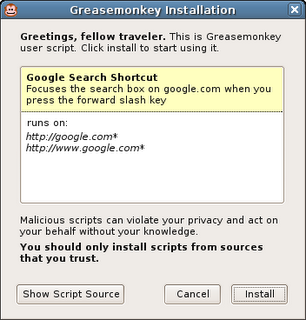
The new script installation UI is a bit of a change. When I first wrote Greasemonkey, it was intended to be for JavaScript hackers only. I didn't envision there even being a UI at first -- just some configuration files. But now that lots of non-programmers use Greasemonkey, displaying the source code when you click on a user script doesn't make much sense.

When you click on a user script now, it pops up an installation dialog that shows the title, description, and pages the script will be included on. If you want to see the source code, you can still do that by clicking "View Script Source" in the install dialog or in the user script's context menu.

Thursday, July 27, 2006

Greasemonkey 0.6.5 - 2.0 support and localization

I'm happy to announce Greasemonkey 0.6.5, which includes support for Firefox 2.0 beta 1 and basic localization in Czech, Dutch, and German. I've also fixed up the problems in the CVS main branch for people where were trying to use source directly.

Thanks to Chris Feldmann for internalization code, esquifit for a 2.0 compatibility patch, and all those who helped test.

Sunday, December 04, 2005

Workarounds for missing XMLHttpRequest, DOMParser, and XMLSerializer

Update: Over on the Greasemonkey mailing list, Joe la Poutre notices an even easier workaround. All you have to do is use the older form of the XPCNativeWrapper constructor to access a specific property. I'm not even sure why this works, but it does:

var parser = new XPCNativeWrapper(window, "DOMParser").DOMParser();
alert(parser.parseFromString("", "text/xml"));

Leaving the below, just for posterity...


One bittersweet part about releasing Greasemonkey 0.6.4 was that I needed to remove support for the XML Extras module which contains such goodies as XMLHttpRequest, DOMParser, and XMLSerializer.

I knew that many people were using XMLHttpRequest, particularly since GM_xmlhttpRequest, it's cross-domain replacement evaporated temporarily in 0.3.5, and that this would be a pain point. However, when weighing those people having to change their scripts to use GM_xmlhttpRequest and the alternative of having a confusingly inconsistent security model, I chose the former. I also fixed the major scripts I knew of, such as GMail Conversation Preview, which used XMLHttpRequest.

What I didn't expect at all was that people would miss DOMParser and XMLSerializer. I had no idea any scripts even used these. It's really neat to find people using pieces of your tool which you didn't expect them to, in ways you didn't expect them to. This makes me incredibly happy. Go user scripters! :-)

Anyway, to make a long story short, I've received many questions asking how to work around the lack of these two classes. The good news is that not only is there a workaround, there are three of them!

1. Use unsafeWindow.DOMParser and unsafeWindow.XMLSerializer

The downside here is that, as the name says, unsafeWindow is a reference to the content actual window - the same one that the content's JavaScript uses. Because of that, calling into it can make your script vulnerable to interference by the content script. This can be OK if you trust the site you are scripting somewhat. Take a look at the unsafeWindow details to decide whether you think this is appropriate for your script.

2. Use E4X

In a very zen turn of events it turns out that although Firefox 1.5 denies user scripters the XPCOM-based XML parsing and serializing they were accustomed to, it provides them with a brand-new - arguably superior - interface.

E4X is a brand new native JavaScript XML API that ships with Firefox 1.5 and is available to Greasemonkey scripts. There's not a ton of documentation yet, but from my experience with it so far, it's vastly more elegant and pleasant to work with than the DOM interfaces.

You can get more information about E4X, including the ECMA specification and a handy expression tester, at these URLs:

http://developer.mozilla.org/en/docs/E4X
http://www.ecma-international.org/publications/standards/Ecma-357.htm
http://www.linkwerk.com/pub/javascript/e4x/e4x-tester/

One caveat to keep in mind is that, in accordance with the E4X spec (don't ask me, it's insane), the input XML must not have an XML declaration. So you usually need to use a regex to strip it before parsing. For example:

var xml = new XML(xmlStringWithDecl.replace(/<\?xml.*?\?>/g, ""));


3. Use an IFRAME and let Mozilla do the dirty work

Many have pointed out that Mozilla already ships with an excellent, and very robust XML parser. It also ships with an HTML parser. Why not just leverage those? You can, it just takes a bit of hacking. I put an example of how to use an IFRAME to parse an HTML document into a DOM on my website.

Greasemonkey HTML Parser

Of course, just by changing the content type from text/html to text/xml, you could use the same technique to parse XHTML or even raw XML.


So I hope this shows that although the way to do certain things has changed, no capabilities have been removed from Greasemonkey. In fact new ones have been added, and the addition of completely isolating user scripts from content improved the reliability and security of Greasemonkey quite a lot.

Sorry for the disturbance, you may now resume your madcap exploration and use of Greasemonkey for all manner of things I never expected.

Mozdev back - Greasemonkey page updated

After some downtime due to increased load from the Firefox 1.5 release, mozdev is back. I took the opportunity to update the Greasemonkey homepage and authoring page.

Friday, December 02, 2005

Slides from Nov 8 Emerging Technology SIG

Last month I was asked to give a presentation about Greasemonkey at the Emerging Technology SIG here in Mountain View. I was bored with my old presentation format, so I redesigned it.

View the slides.

And here's the zipped package if you want to use the format for your own presentation.

The old format also had some issues. I found that personally, the more words that were on each slide, the more I was obligated to say on each slide. It made me uncomfortable, knowing that people would see if I didn't say something I had planned to.

My girlfriend, Susan, mentioned that I actually speak about Greasemonkey quite well off the cuff. So I stole an idea from other presentations I've seen and put very few words on each slide. I felt like this gave me more freedom to just talk - expanding on areas people seemed interested in, and skipping areas they didn't.

There is only a very vague structure to this presentation. It's divided into several high-level sections, and each section progresses through a few phases:
  • Question
  • Exploration, broad answers, more questions
  • Restate Question
  • Concise answer
I don't know if this is applicable to other presentations, but it seemed to work for Greasemonkey. Maybe Greasemonkey just has a lot of questions surrounding it :-).

Thursday, December 01, 2005

Broken Scripts Fixed

In abscense of the wiki-like features that Jesse is building into userscripts.org, I am keeping a list of scripts I have fixed for 0.6.4 at http://userscripts.org/fixes. I'll also post a comment on the userscripts.org page for the scripts when I make these changes.

I'll keep the script there until the author updates the original location and pings me. If you're having trouble with a script, send a mail to the mailing list, or leave a comment, and maybe I'll take a look.

Wednesday, November 30, 2005

Greasemonkey 0.6.4

It's been a long road, but a stable, secure, and much improved Greasemonkey is now available for Firefox 1.5.

Install Greasemonkey 0.6.4

This is for Firefox 1.5 only and will not install on previous Firefoxen. If you use a Firefox version prior to 1.5, you should continue using Greasemonkey 0.5.3.

Some of the changes required for security caused minor API changes. If you are a developer and your script breaks in Greasemonkey 0.6.4, consult the wiki for information on how to fix it. Or, as always, ask on the mailing list.


What's new since 0.5.x?

  • Monkey menu: Right-click on the monkey to get quick access to enable or disable the scripts which apply to this page.

  • New install UI: There's a cute new yellow install bar like the one that's displayed for extensions when you load a user script file. When you install, you get a simple animation in the status bar for the loading progress followed by a single dialog when installation is successful.

  • New injection system: We now use a much stabler injection system which is only available to Firefox 1.5. This should solve all double-injects or non-injects.

  • The document.domain bug which was causing scripts to not inject on sites such as myspace.com fixed.

  • New migration system: Greasemonkey no longer tries to migrate the script folder's location on install, which was causing install headaches for some users. Instead, it uses the old location if a previous version was already installed.

  • Fastback support: Previous Greasemonkeys interfered with Firefox 1.5's awesome Fastback feature. This release does not.

  • Remove script prefs when uninstalling the scripts. Sort of; see issues.


Known Issues:
  • When uninstalling scripts, the "also uninstall script preferences" checkbox looks works when "OK" is clicked, rather than when "uninstall" is clicked. In other words, before confirming uninstallation of scripts, make sure the checkbox is selected to also remove the associated prefs. This is needlessly confusing.

Monday, September 12, 2005

Firefox 1.5-compatible Greasemonkey beta now available

I've posted a beta of the next version of Greasemonkey to userscripts.org. You can access it at:

http://userscripts.org/greasemonkey-0.6.2.xpi

This is for Firefox Beta 1.5 only and will not install on other Firefoxes. If you use a version of the browser prior to 1.5, then you should continue using Greasemonkey 0.5.3.

It's a beta, which means that it will likely break some number of your existing, working scripts. Please report these on the mailing list and to the script author. Many breakages will be up to the script author to correct. Typically, the changes required are minor. Authors should consult the Greasemonkey Wiki or mailing list for help.

There is currently no Greasemonkey 0.5.x for Firefox 1.5 beta. It's my hope that user script authors will update their scripts so that such a release is not necessary. So please, bug script authors whose scripts break :-).


What's new?
  • Monkey menu: Click the monkey to get quick access to enabling and disabling each of your scripts. You can also see at a glance which scripts ran on the current page.

  • New install UI: We no longer pop up two modal dialogs everytime you install a script. Instead, a simple animated status message to the left of the monkey tells you everything went OK.

  • New injection system: We now use a much stabler injection system which is only available to Firefox 1.5. This should solve all double-injects or non-injects (except for document.domain issues discussed below).

  • New migration system: Greasemonkey no longer tries to migrate the script folder's location on install, which was causing install headaches for some users. Instead, it uses the old location if a previous version was already installed.

  • Fastback support: Previous Greasemonkeys interfered with Firefox 1.5's awesome Fastback feature. This release does not.

Known Issues:

  • Update: If you install Greasemonkey 0.6.2 without any prior version installed, installing scripts will not work. You'll see a "file not found error. We'll be updating soon to fix this and are sorry for the bug. Meanwhile, the following will fix you up:

    1. cd <your profile directory>

    2. mkdir gm_scripts

    3. Unix: touch gm_scripts/config.xml

    4. Windows: echo "" > gm_scripts\config.xml


  • Greasemonkey 0.6.2 does not inject on websites which use the document.domain javascript property. Notable examples are search.ebay.com and yahoo.com. This is due to a Firefox bug which will be fixed before 1.5 ships.

  • Scripts which use any of the properties of the location object fail with NS_ERROR_INVALID_POINTER. This is due to a Firefox bug which will be fixed before 1.5 ships. As a temporary workaround, script authors may wrap code which accesses the location object with a window.setTimeout call. So for instance, instead of window.location.replace('foo'), use window.setTimeout(function(){ window.location.replace('foo') });.

XPCNativeWrapper reminders:

The window and document properties in Greasemonkey 0.6.x are XPCNativeWrapper objects, which have many annoying limitations as compared to the normal DOM objects. You can keep up with all the details as documented on the Greasemonkey wiki.

Sunday, September 04, 2005

General update

This bug with migration which everyone keeps encountering is really frustrating. It occurs on a large percentage of machines, but not for any of the Greasemonkey developers. For anyone who is still seeing problems where GM appears to not work at all after upgrading to 0.5.x, please see the directions here for a simple fix.

I have created a patch which forgoes automatic migration completely and just warns the user that they need to move the folder by hand, but I'm not sure whether to push it yet. I suppose it depends on how many people who were using 0.3.x have not yet upgraded.

In other news, I've made quite a bit of progress on a new Greasemonkey - 0.6 - which uses a more stable injection technique which should solve a whole other class of problems. It works really well, is super simple, and uses standard APIs. So I don't expect it to have the same inconsistency across machines that the 0.5 series does.

Unless I keep getting a ton of reports about bad migrations, I think I'll just leave 0.5.3 as the last of that branch and focus on 0.6, which will not have auto-migration, and thus cannot have this nasty migration bug.

I guarantee that nobody is more frustrated by these bugs than me. But 0.6 should be a lot better. So just hang on, and we can all forget 0.5 as soon as possible :-).

Saturday, September 03, 2005

0.5.3 available

Though still in the review queue on mozilla update, 0.5.3 is available for download directly from userscripts.org right now.

This update solves the problems with migration from 0.3.5 that some people where having with 0.5.1. It also fixes the "Install User Script" menu item always available bug that pissed a lot of people off.


I'm still working on improving the injection system, which will solve all the random injection problems people are having. This will show up in Greasemonkey 0.6.

0.5.2 late

Somebody discovered a new injection issue (:: sigh ::) in 0.5.2, so I put it off slightly. I'll be rolling back that commit and then reposting it hopefully tonight.

These issues are highly personal, and seem to have to do with network connection, cpu speed, etc. Which is why I'm moving Greasemonkey back to a simpler injection system which should be more fool-proof.

Many people are using 0.5.x without trouble (everyone who tested the alphas on the mailing list, for example). For those of you for whom it isn't, I'm not ignoring you. The next version of Greasemonkey should work much better.

Thursday, September 01, 2005

0.3.5 -> 0.5.1 migration madness

There is a bug in the migration code for Greasemonkey 0.5.1 which is affecting some windows users. 0.5.2 fixes this issue, and has been circulated through the mailing list and is looking good, but I won't be able to post it until tonight.

If you want to fix your 0.5.1, I don't think it's a good idea to edit the profile files directly unless you really know what you're doing. Instead, these steps should fix most people's corruption.
  • Shut down Firefox.
  • Find your profile directory
  • Move profileDir/extensions/{e4a8a97b-f2ed-450b-b12d-ee082ba24781}/chrome/
    greasemonkey/content/scripts/ to profileDir/scripts.
  • Remove profileDir/gm_scripts if it exists
  • Rename profileDir/scripts to profileDir/gm_scripts
  • Restart Firefox

Thursday, August 25, 2005

Greasemonkey 0.5.1 Final

Huzzah!

Greasemonkey 0.5.1 Final is available for download.

Special thanks to "t" for reporting a user script escalation issue in the previous beta which has now been fixed.

Other changes:
  • Bug 10107 - Allow users to select a script editor. This also allows script editing to work for *nix users.
  • Bug 11214 - Clicking "Edit" in Manager loses enable/disable changes
  • Bug 11224 - Grease monkey doesn't accept non english characters!
  • Bug 11236 - The install context menu won't show if there's a node under the A element

Sunday, August 21, 2005

Gmail Preview

Mihai rocking with another great Greasemonkey script for Gmail. This one adds full preview to your inbox items. Very smooth, a definite install.

Saturday, August 06, 2005

Aaron's OSCON 2005 slides

Some people who were at OSCON and saw my presentation asked if they would be able to get the slides online.

I've posted them to my website
. You can also download them.

OSCON was a lot of fun. Here's what I've been able to learn about Portland:
  • People: very friendly
  • summer weather: great
  • public transport: efficient and clean
  • food: superb
  • Montage: recommended
  • Burnside skaters: insane
  • Nightlife: very amusing
  • Books: available
So in general, utopia. A fine place for a nerd conference.

Tuesday, August 02, 2005

Mozdev down

It would appear that mozdev.org - which generously hosts Greasemonkey's website - is down today.

Luckily, the Greasemonkey installer is not actually hosted on mozdev. So you can still install Greasemonkey by going directly there.